OpenDCS Algorithms - Resources
Algorithms Resources - Recap
There are a number of “Standard” or “Baseline” algorithms that come with OpenDCS when it is installed. These can be thought of as banked algorithms or functions that can be called upon when setting up a computation. These standard algorithms are generally basic arithmetic or time series manipulation or transformations. For example, the average algorithm (AverageAlgorithm)can be used to create a daily or monthly time series from an hourly or daily time series, respectively. In addition to simple arithmetic and transformations, there are some specific algorithms that are commonly used in water resources management. For example the incremental precipitation algorithm (IncrementalPrecip) can be called upon to calculate an incremental precipitation time series from a cumulative precipitation time series. Additionally there are also some algorithms that calculate flow based on various time series input.
This page is intended to provide further details and examples of the default algorithms. Nearly all of these algorithms have properties that can be set to tweak the way the algorithm is executed. For example, the properties can address time shifts, missing values, change how default upper and lower bounds are handled, etc. It is recommended to understand how the basic default algorithm behaves before advancing to editing the properties.
This page is divided into three sections:
OpenDCS Standard Algorithms
OpenDCS Custom Algorithms
OpenDCS Algorithm GUI Basics
As a recap, below is a table of algorithms that come with OpenDCS installs.
Type |
Algorithm |
Exec Class |
|---|---|---|
|
AddToPrevious |
decodes.tsdb.algo.AddToPrevious |
AverageAlgorithm |
decodes.tsdb.algo.AverageAlgorithm |
|
ChooseOne |
decodes.tsdb.algo.ChooseOne |
|
CopyAlgorithm |
decodes.tsdb.algo.CopyAlgorithm |
|
CopyNoOverwrite |
decodes.tsdb.algo.CopyNoOverwrite |
|
DisAggregate |
decodes.tsdb.algo.DisAggregate |
|
FillForward |
decodes.tsdb.algo.FillForward |
|
Resample |
decodes.tsdb.algo.Resample |
|
RunningAverageAlgorithm |
decodes.tsdb.algo.RunningAverageAlgorithm |
|
ScalarAdder |
decodes.tsdb.algo.ScalerAdder |
|
SubSample |
decodes.tsdb.algo.SubSample |
|
SumOverTimeAlgorithm |
decodes.tsdb.algo.SumOverTimeAlgorithm |
|
|
BridgeClearance |
decodes.tsdb.algo.BridgeClearance |
EstimatedInflow |
decodes.tsdb.algo.EstimatedInflow |
|
IncrementalPrecip |
decodes.tsdb.algo.IncrementalPrecip |
|
RdbRating |
decodes.tsdb.algo.RdbRating |
|
TabRating |
decodes.tsdb.algo.TabRating |
|
UsgsEquation |
decodes.tsdb.algo.UsgsEquation |
|
VirtualGage |
decodes.tsdb.algo.VirtualGage |
|
RelativeHumidity |
decodes.tsdb.algo.RelativeHumidity |
|
|
CentralRunningAverage |
|
Division |
||
GroupAdder |
||
Multiplication |
||
PeriodToDate |
||
Stat |
||
|
ExpressionParserAlgorithm |
|
FlowResIn |
||
WeightedWaterTemperature |
The following two tables are the algorithms specific to CWMS or HDB.
Type |
Algorithm |
Exec Class |
|---|---|---|
|
CentralRunningAverage |
decodes.cwms.rating.CwmsRatingMultIndep |
Division |
decodes.cwms.rating.CwmsRatingSingleIndep |
|
GroupAdder |
decodes.cwms.validation.CwmsScreeningAlgorithm |
|
Multiplication |
decodes.cwms.validation.DatchkScreeningAlgorithm |
|
ToIrregularUsingPattern |
decodes.cwms.algo.ToIrregularUsingPattern |
|
|
CallProcAlg |
decodes.hdb.algo.CallProcAlg |
DynamicAggregateAlg |
decodes.hdb.algo.DynamicAggregateAlg |
|
EOPInterpAlg |
decodes.hdb.algo.EOPInterpAlg |
|
EquationSolverAlg |
decodes.hdb.algo.EquationSolverAlg |
|
EstGLDAInflow |
decodes.hdb.algo.EstGLDAInflow |
|
FLGUUnreg |
decodes.hdb.algo.FLGUUnreg |
|
FlowToVolumeAlg |
decodes.hdb.algo.FlowToVolumeAlg |
|
GLDAEvap |
decodes.hdb.algo.GLDAEvap |
|
GLDAUnreg |
decodes.hdb.algo.GLDAUnreg |
|
GlenDeltaBSMBAlg |
decodes.hdb.algo.GlenDeltaBSMBAlg |
|
HdbLookupTimeShiftRating |
decodes.hdb.algo.HdbLookupTimeShiftRating |
|
HdbShiftRating |
decodes.hdb.algo.HdbShiftRating |
|
InflowAdvancedAlg |
decodes.hdb.algo.InflowAdvancedAlg |
|
InflowBasicAlg |
decodes.hdb.algo.InflowBasicAlg |
|
MPRCUnreg |
decodes.hdb.algo.MPRCUnreg |
|
NVRNUnreg |
decodes.hdb.algo.NVRNUnreg |
|
ParshallFlume |
decodes.hdb.algo.ParshallFlume |
|
PowerToEnergyAlg |
decodes.hdb.algo.PowerToEnergyAlg |
|
SideInflowAlg |
decodes.hdb.algo.SideInflowAlg |
|
SimpleDisaggAlg |
decodes.hdb.algo.SimpleDisaggAlg |
|
TimeWeightedAverageAlg |
decodes.hdb.algo.TimeWeightedAverageAlg |
|
VolumeToFlowAlg |
decodes.hdb.algo.VolumeToFlowAlg |
OpenDCS Standard Algorithms
Standard - Arithmetic
In this section a number of the default standard algorithms are presented. These algorithms are grouped together because generally these algorithms are for executing simple arithmetic.
Algorithm |
Description |
|---|---|
AddToPrevious |
Adds the current value to the previous value |
AverageAlgorithm |
Averages an ‘input’ parameter to an ‘average’ parameter |
ChooseOne |
Given two inputs, output the best one |
CopyAlgorithm |
Copies an ‘input’ parameter to an ‘output’ parameter |
CopyNoOverwrite |
Copies an ‘input’ parameter to an ‘output’ parameter |
DisAggregate |
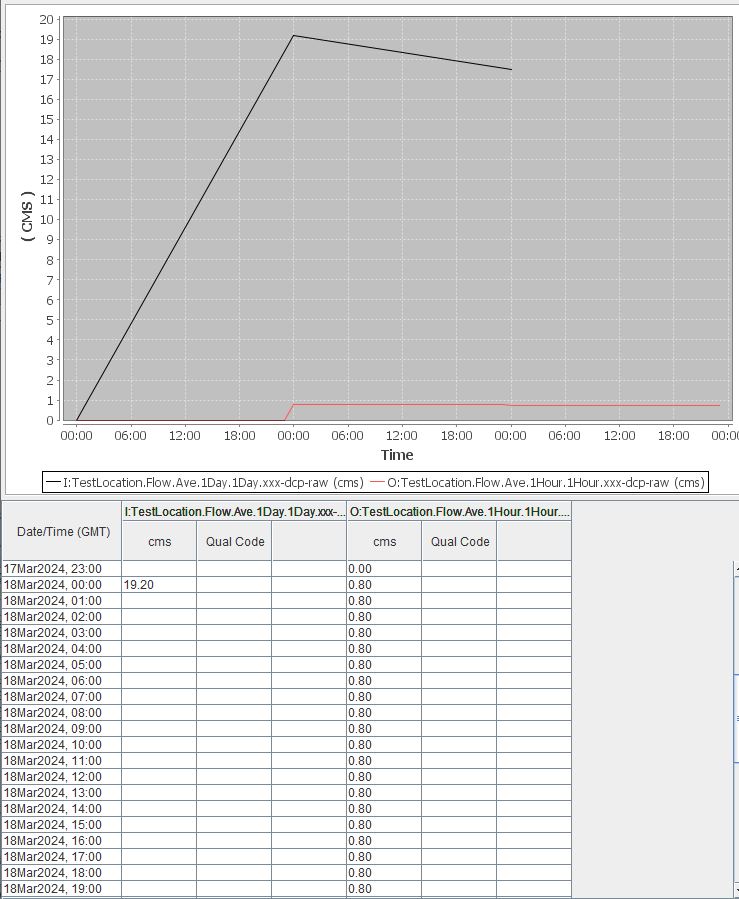
Spreads out the input values to outputs in various ways |
FillForward |
Project an input value by copying it forward in time |
Resample |
Resample an input to an output with a different interval |
RunningAverageAlgorithm |
Averages an ‘input’ parameter to an ‘average’ parameter |
ScalarAdder |
Multiples up to 10 ‘input’ values by coefficients |
SubSample |
Convert a short interval to a longer interval |
SumOverTimeAlgorithm |
Sums single ‘input’ parameter to a single ‘sum’ parameter |
ToIrregularUsingPattern |
Interpolates an ‘input’ to have dates matching Pattern |
Recall, that when a computation is set up, the output is a separate time series. Input time series are NOT being manipulated or edited.
AddToPrevious
Exec Class: decodes.tsdb.algo.AddToPrevious
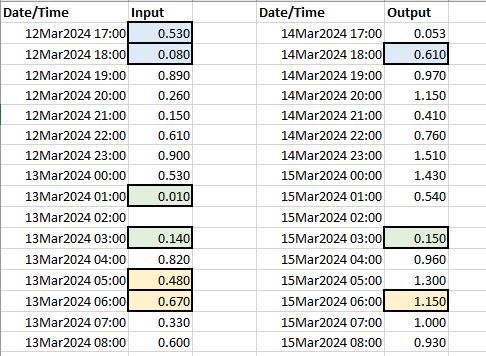
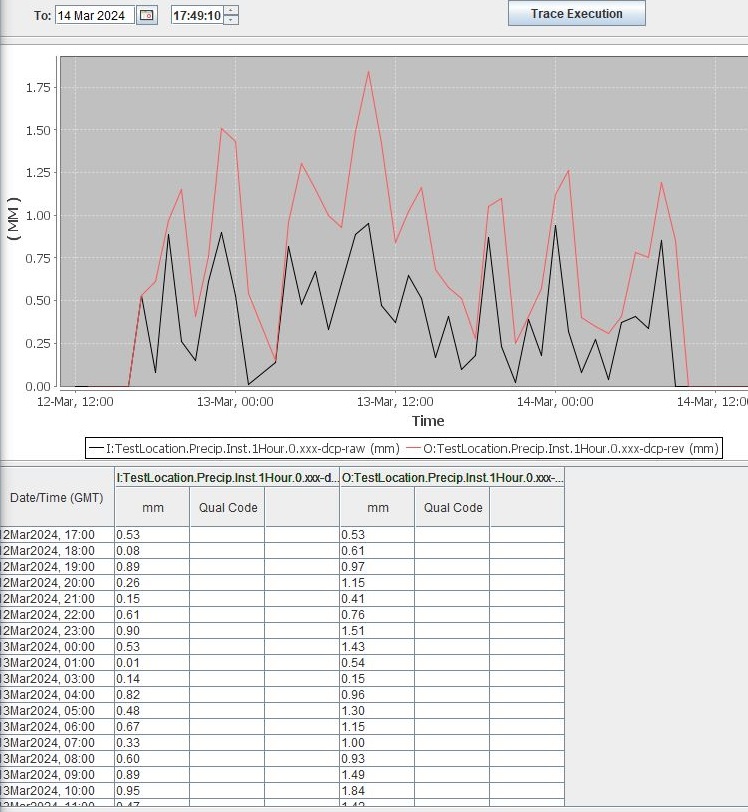
The “Add To Previous” algorithm AddToPrevious adds the previous value to the current value. By default, the following criteria are assumed or executed.
If the previous time slice is missing, the prior non-missing value will be added to the current value.
If a current time slice is missing a value, then the corresponding output time slice will also be missing.
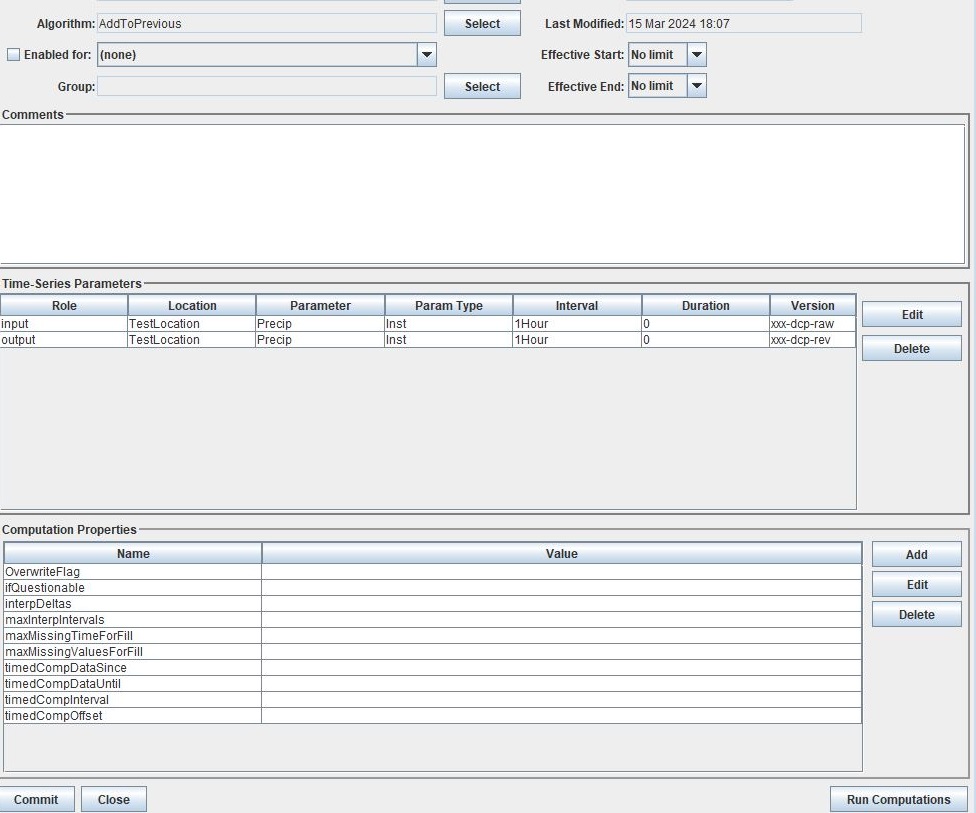
See the image above to better understand how the algorithm behaves.
Role |
Role Name |
|---|---|
Inputs |
input |
Outputs |
output |
AverageAlgorithm
Exec Class: decodes.tsdb.algo.AverageAlgorithm
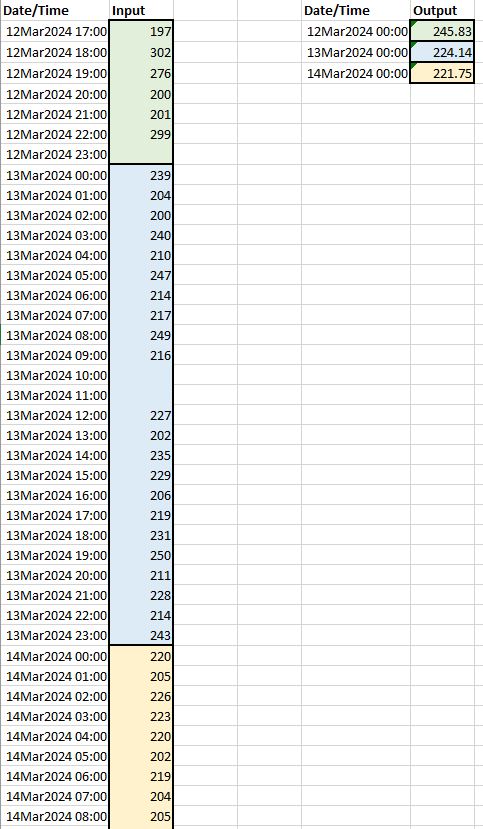
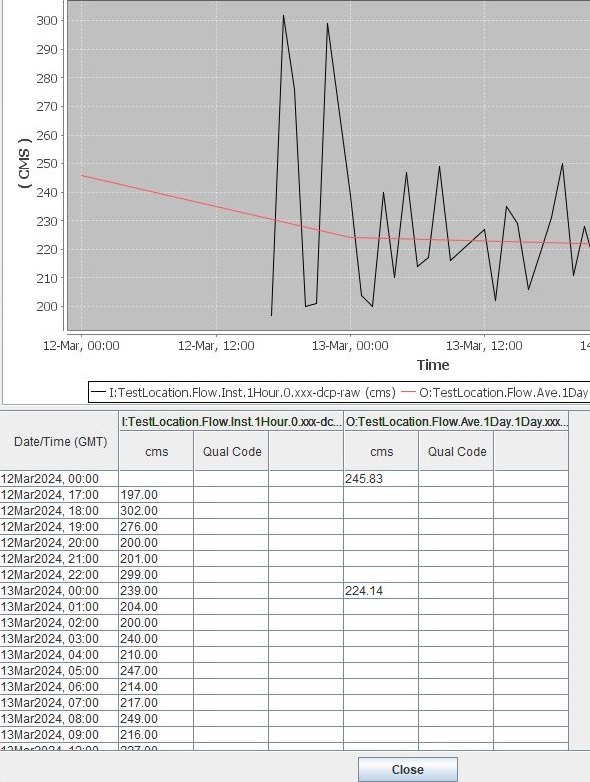
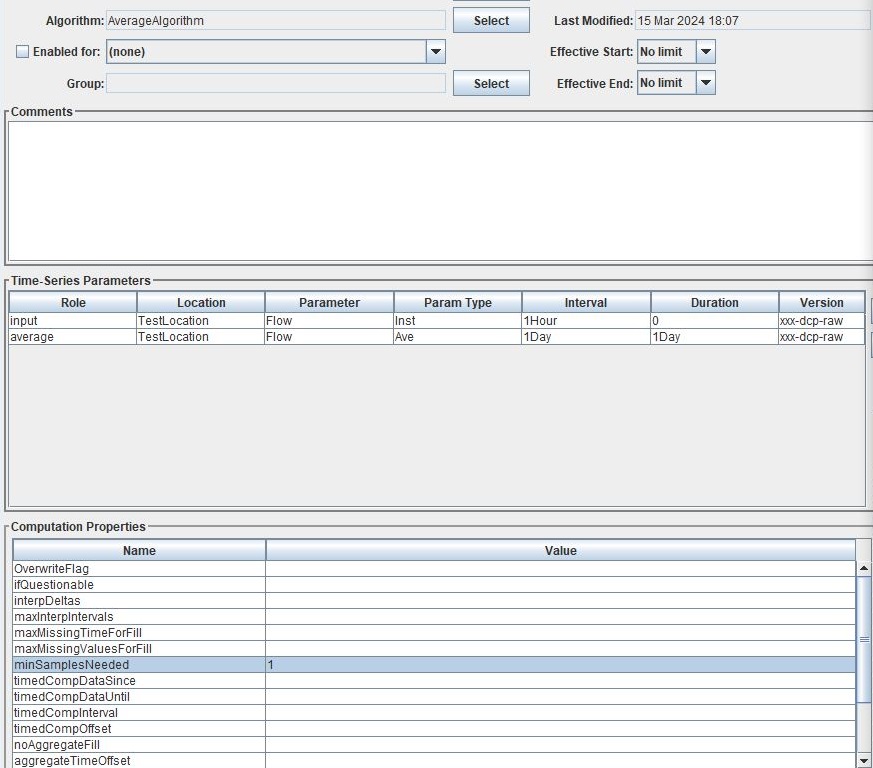
The “Average” algorithm AverageAlgorithm aggregates and calculates an average over a period defined by the output parameter. By default, the following criteria are assumed or executed.
Minimum samples needed for algorithm is 1
Average calculated will include the lower bound
Average calculated will not include the upper bound
Average value will be stored at the lower bound time slice, irregardless of upper/lower bounds defined
If an input is deleted, and as a result the minimum number of samples is no longer met, then the previously calculated output will be deleted.
See the images above and below to better understand how the algorithm behaves.
Role |
Role Name |
|---|---|
Inputs |
input |
Outputs |
average |
ChooseOne
Exec Class: decodes.tsdb.algo.ChooseOne
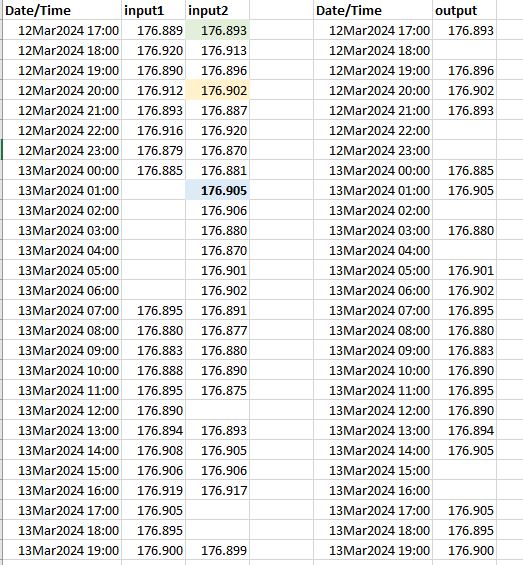
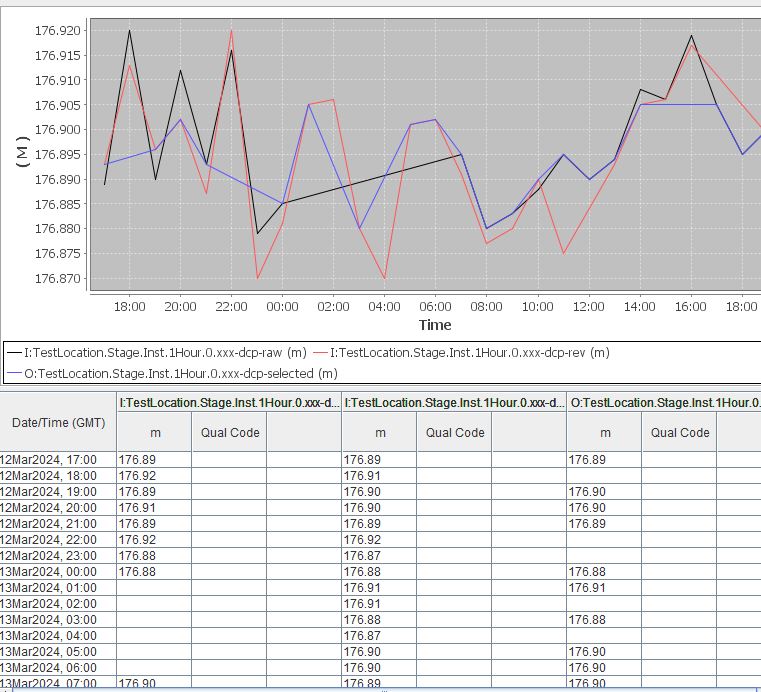
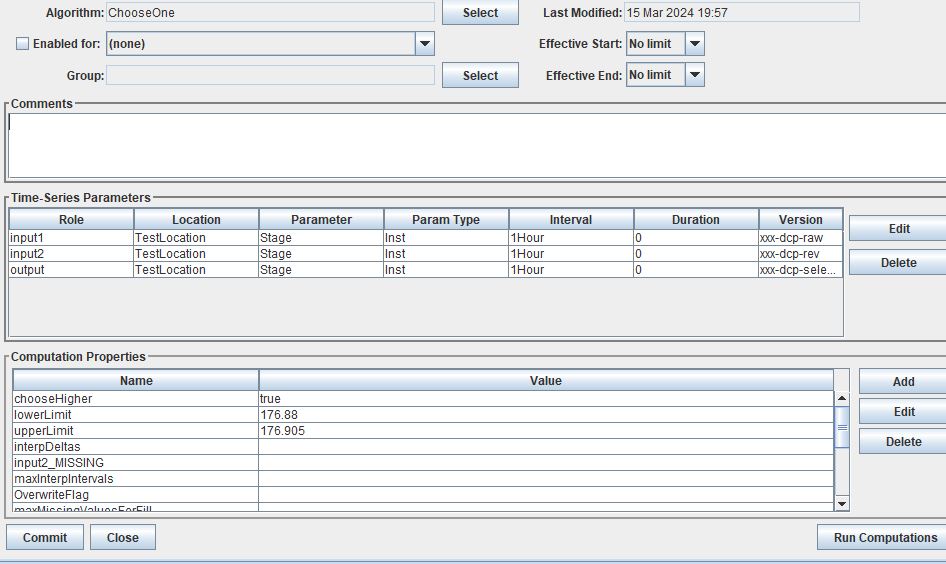
The “Choose One” algorithm ChooseOne will choose one value (the best one) from two time series to output. Additionally, some upper and lower criteria limits can be applied. By default, the following criteria are assumed or executed.
If only one value is provided, and it is acceptable, use this value.
If only one value is provided, and it is not acceptable, use neither.
If two values are within the acceptable limits, use the higher value.
If two values are provided but only one is acceptable, use the acceptable value.
If two values are provided and neither is acceptable, use neither.
Values higher than the upper limit (but not including), will be considered unacceptable.
Values lower than the lower limit (but not including), will be considered unacceptable.
In the example above, the limits are set to an upper limit of 176.905 and a lower limit of 176.88. This means that a value of 176.905 will be considered valid, but 176.906 will be invalid. Likewise, a value of 176.88 will be considered valid but anything lower will be considered invalid.
See the images above and below to better understand how the algorithm behaves.
Role |
Role Name |
|---|---|
Inputs |
input1 |
input2 |
|
Outputs |
output |
CopyAlgorithm
Exec Class: decodes.tsdb.algo.CopyAlgorithm
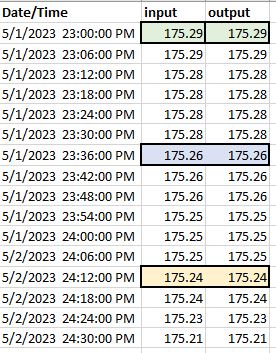
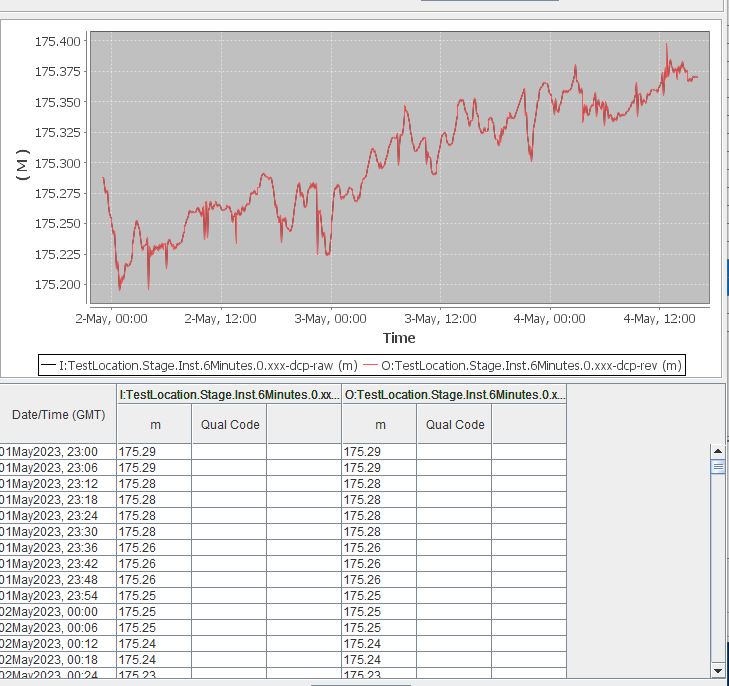
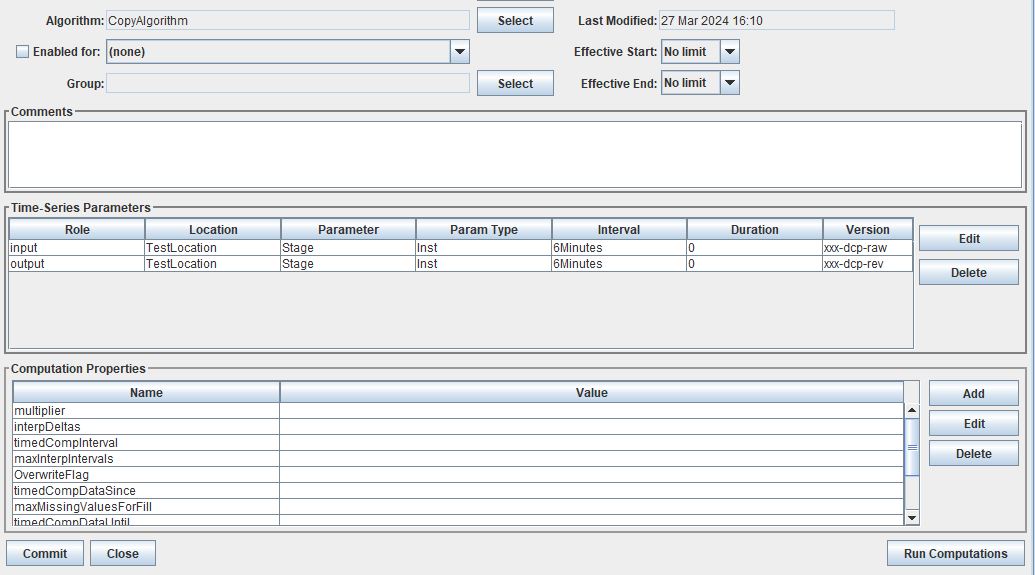
The “Copy” algorithm CopyAlgorithm will simply copy the values from one time series to another time series. By default the output will be at the exact same time slice as the input.
If an input time series is missing and a value exists in the corresponding output time series, then the existing output value will remain (ie NOT be overwritten by a missing value)
Will copy and save all decimal places (i.e. Decimal places displayed in window below are not representative of what the true output is if more decimal places are present in input)
See the images above and below to better understand how the algorithm behaves.
Role |
Role Name |
|---|---|
Inputs |
input |
Outputs |
output |
CopyNoOverwrite
Exec Class: decodes.tsdb.algo.CopyNoOverwrite
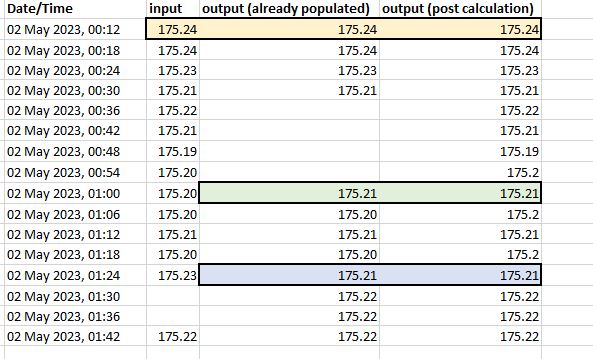
By default the following criteria are met or assumed in the algorithm.
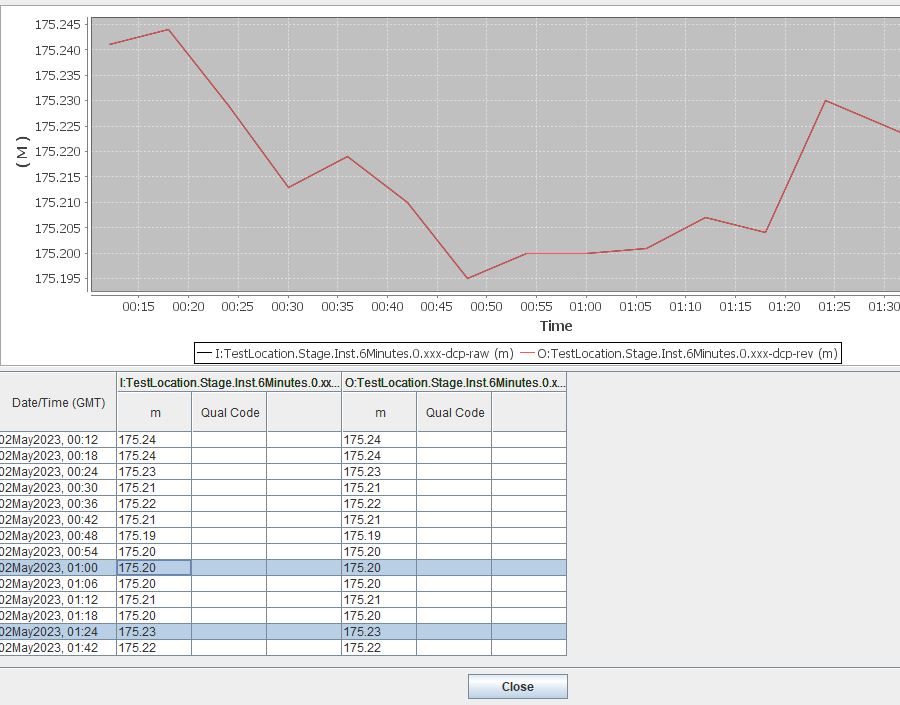
If the output time series already has a value, it will NOT be overwritten by an input value or missing input (Computation Editor does not show what will be saved).
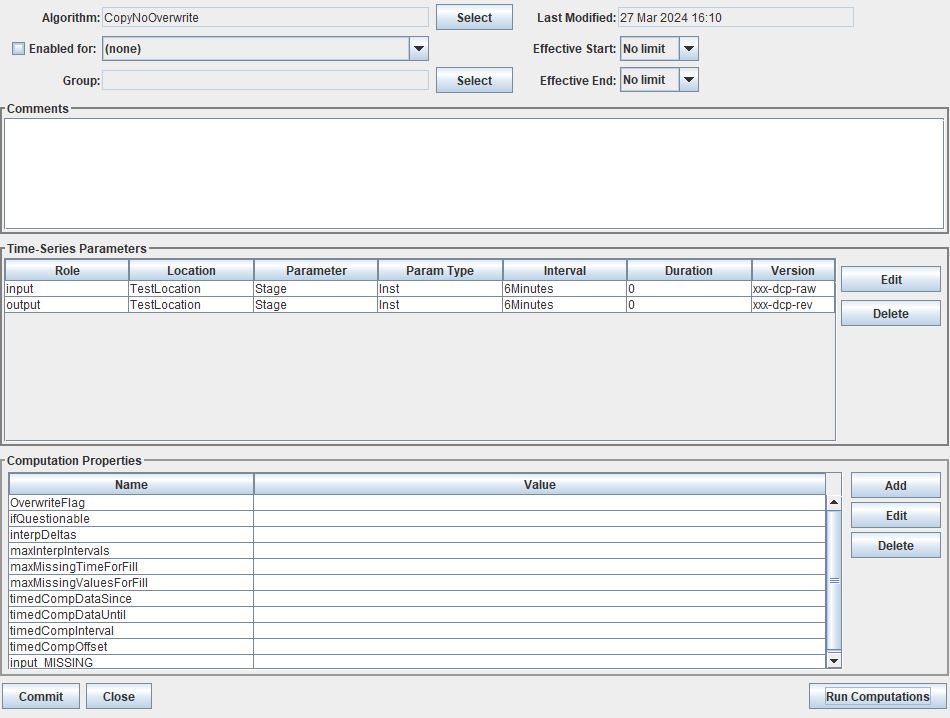
The property “input_MISSING” is set to ignore.
See the images above and below to better understand how the algorithm behaves.
Role |
Role Name |
|---|---|
Inputs |
input |
Outputs |
output |
DisAggregate
Exec Class: decodes.tsdb.algo.DisAggregate
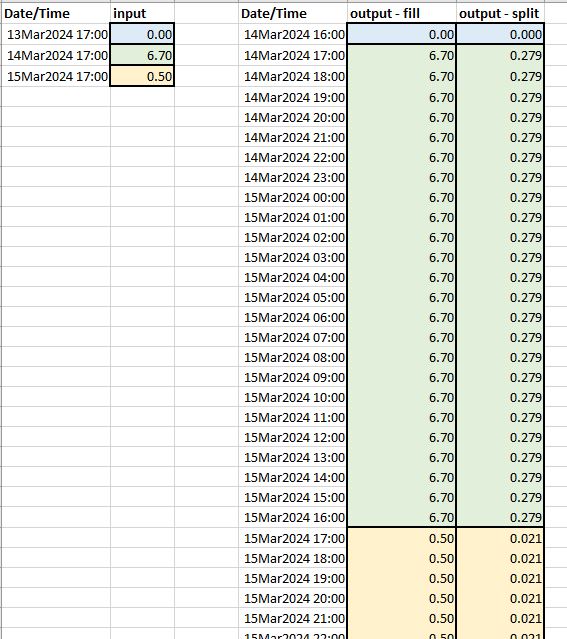
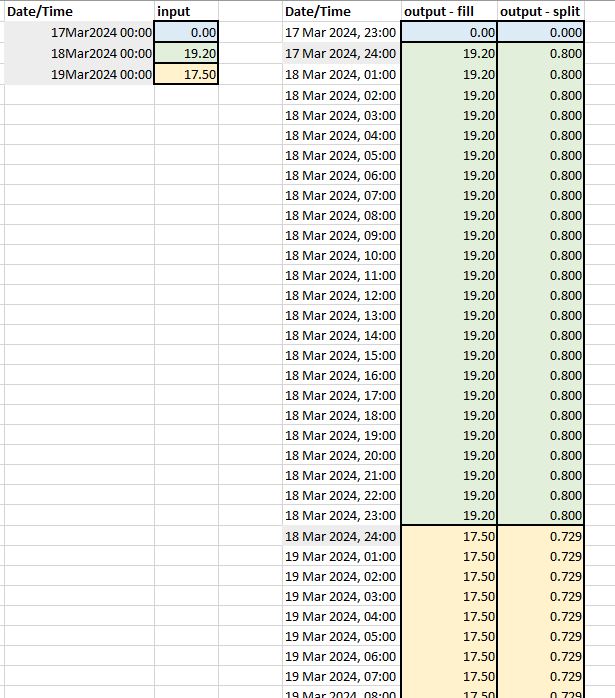
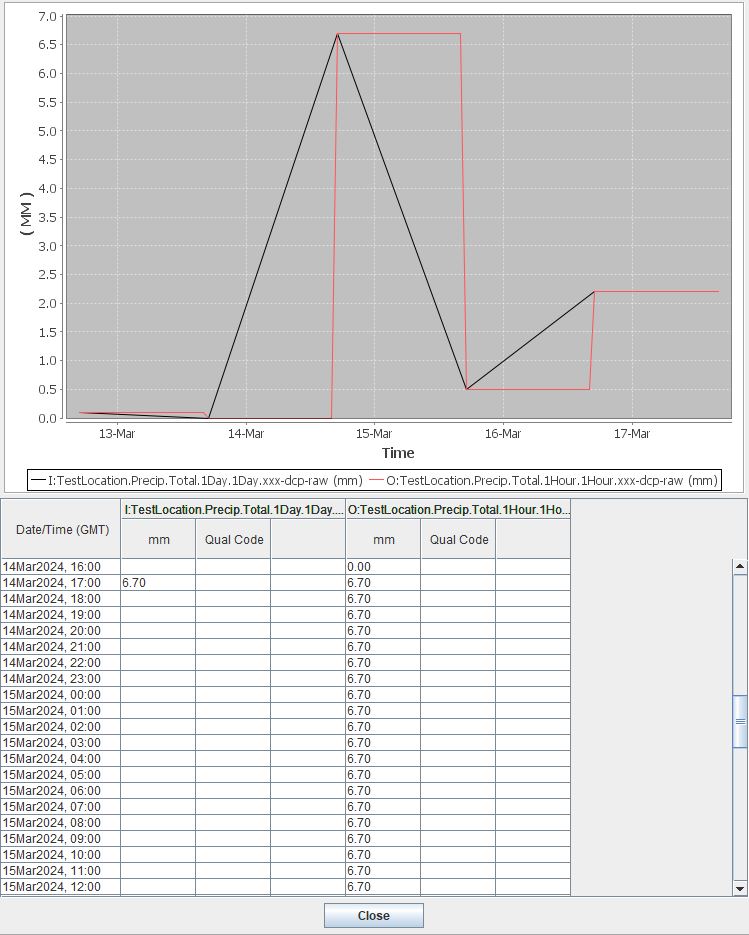
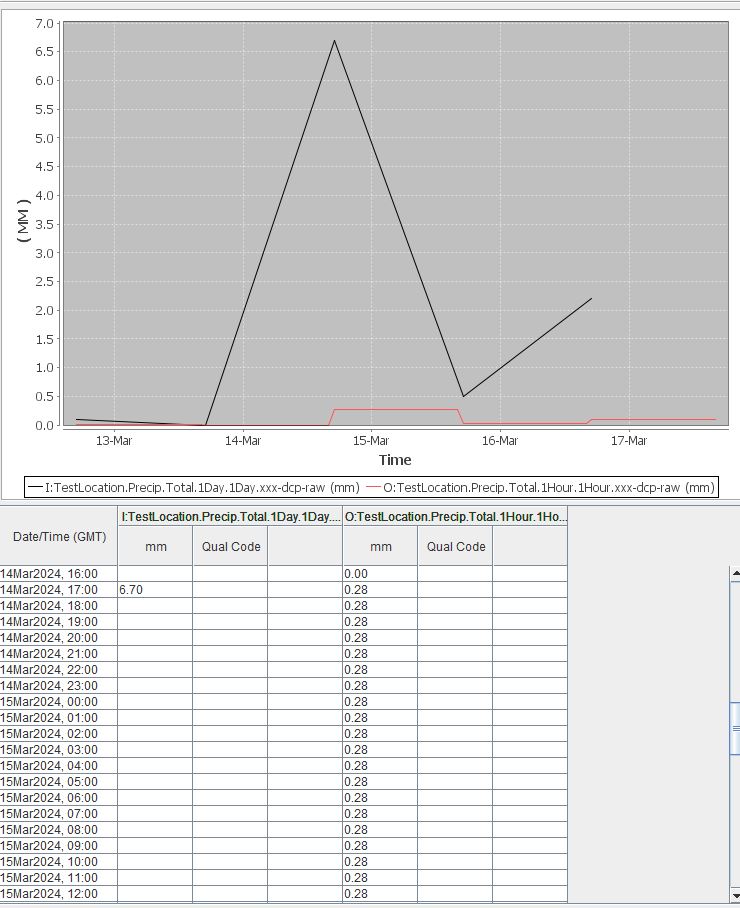
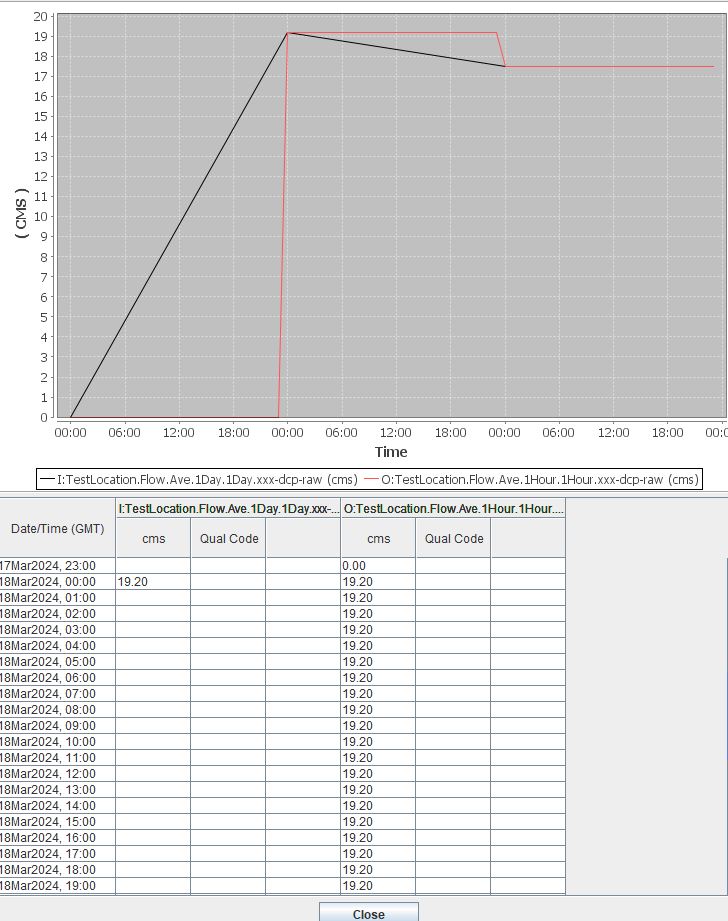
The “disaggregate” algorithm or DisAggregate will take an input time series and spread the values to an output time series. This algorithm requires that the interval of the input is equal to or longer than the output. For example, this algorithm is ideal for converting a daily time series to an hourly time series, or a monthly to a daily time series. There are two methods that this algorithm can be invoked. It will either fill the new time series with the input time value, or split the input over x time slices.
By default the following criteria are met or assumed in the algorithm.
The lower bound of the disaggregated time window is equal to the input time slice.
By default the property “method” will be set to fill.
Only two options for computation method: split or fill.
If an input value is split over x intervals, at least 5 decimal places will save.
See the images above and below to better understand how the algorithm behaves.
Role |
Role Name |
|---|---|
Inputs |
input |
Outputs |
output |
FillForward
Exec Class: decodes.tsdb.algo.FillForward
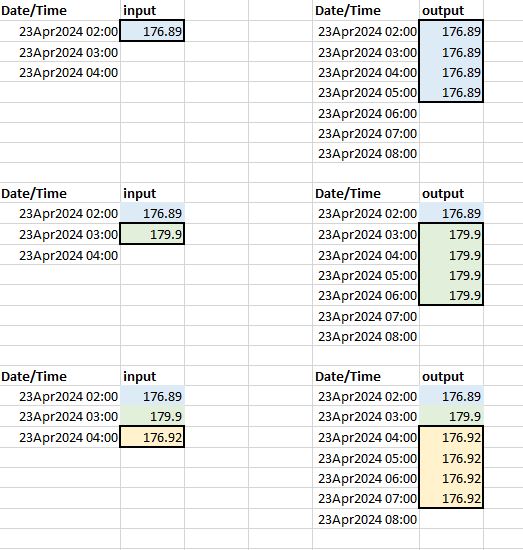
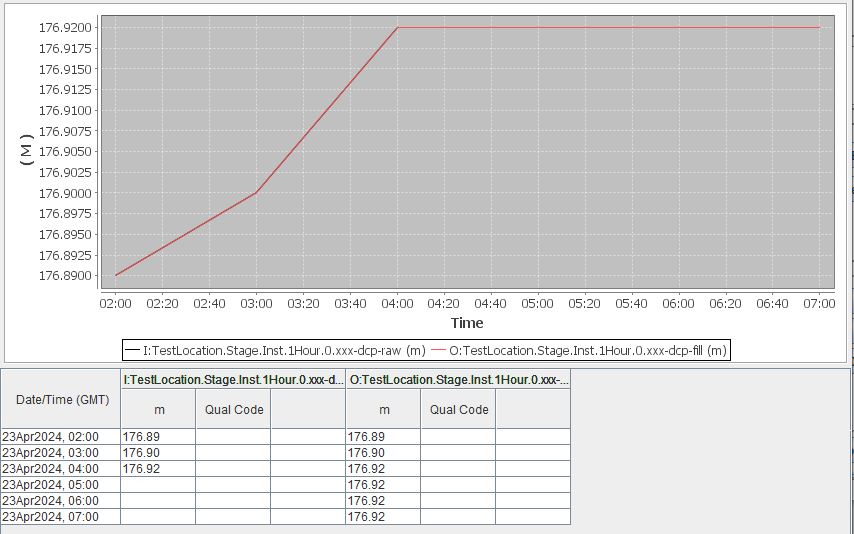
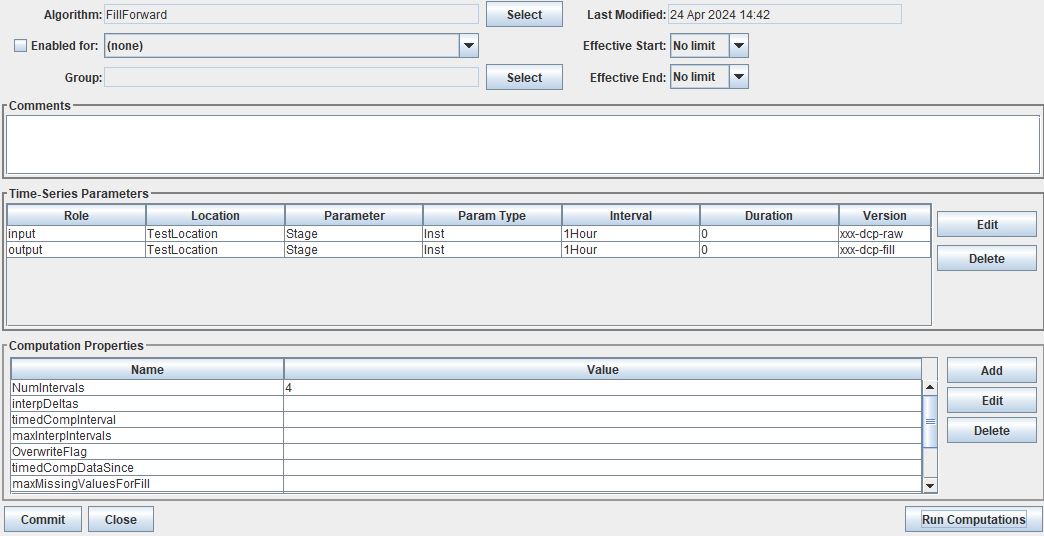
The “fill forward” algorithm or FillForward will take an input time series slice and apply the value x number of time slices forwards, starting with the current time slice. For example, if the property NumIntervals is set 4 then the values at time slice t will be copied to the same time slice t in the output time series, and then copied to 3 time slices forward in time.
By default the following criteria are met or assumed in the algorithm.
Default NumIntervals property is set to 4.
See the images above and below to better understand how the algorithm behaves.
Role |
Role Name |
|---|---|
Inputs |
input |
Outputs |
output |
Resample
Exec Class: decodes.tsdb.algo.Resample
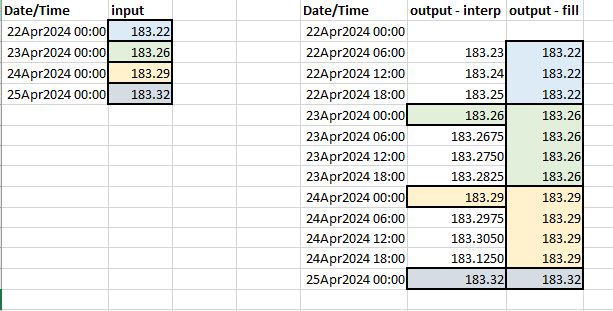
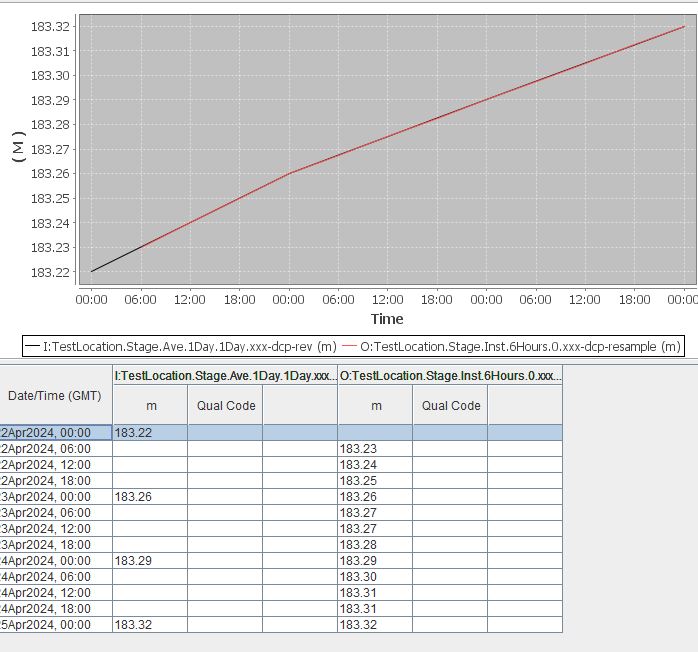
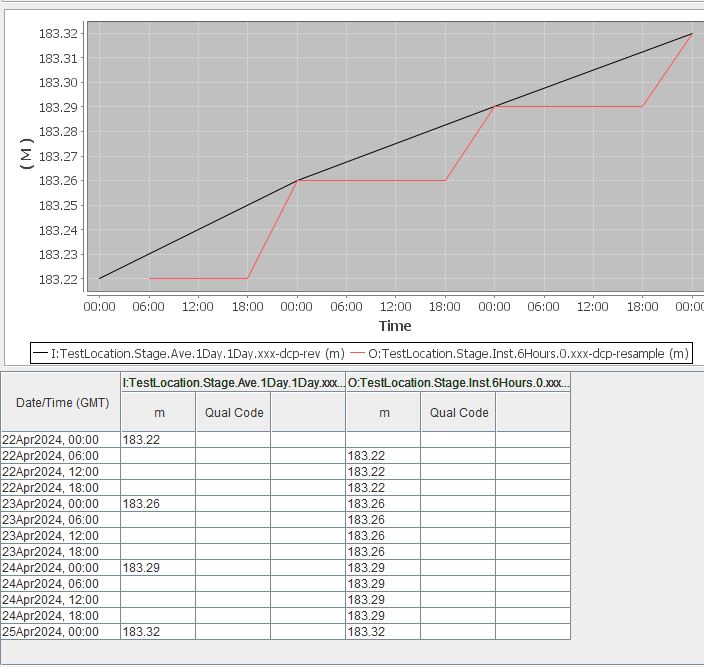
The “resample” algorithm or Resample will take an input time series at some resolution and apply it to a higher time resolution. For example, an input may be a daily time series while the output may be hourly. Or an input may be a monthly time series while the output may be daily.
By default the following criteria are met or assumed in the algorithm.
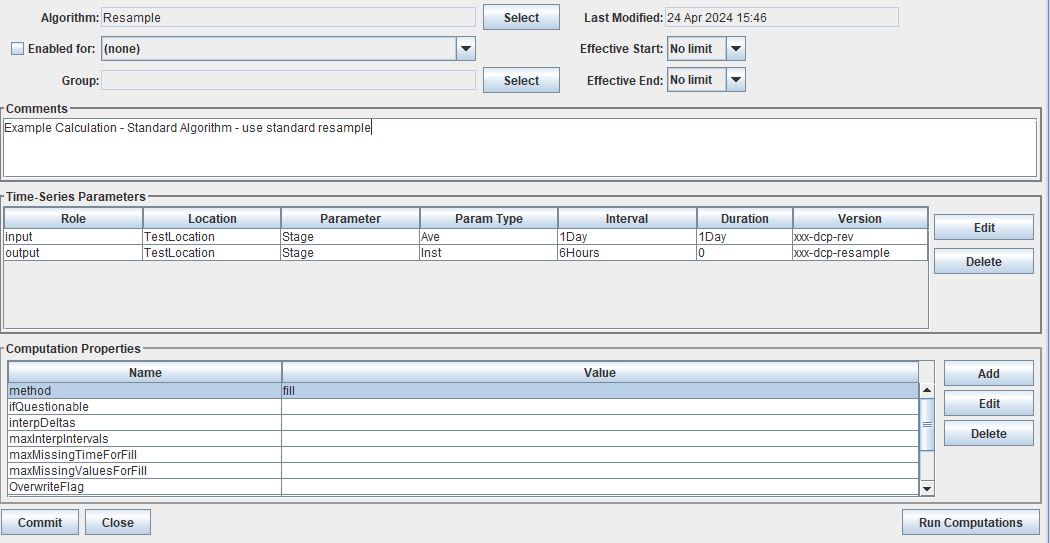
Properties method options are fill and interp
Default Method is interp
See the images above and below to better understand how the algorithm behaves.
Role |
Role Name |
|---|---|
Inputs |
input |
Outputs |
output |
RunningAverageAlgorithm
Exec Class: decodes.tsdb.algo.RunningAverageAlgorithm
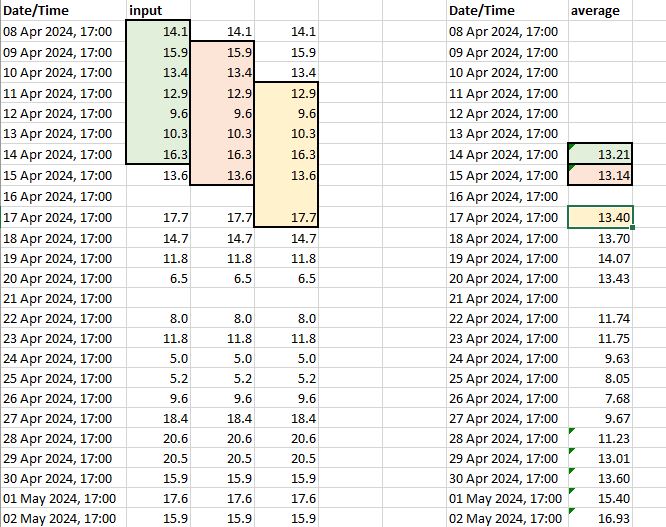
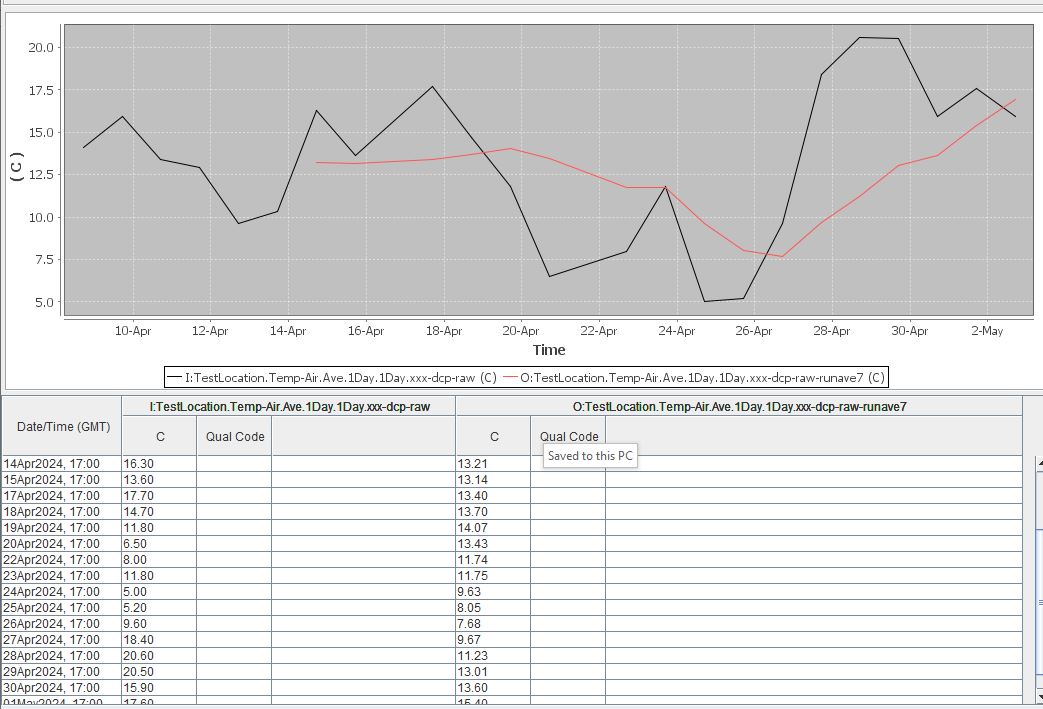
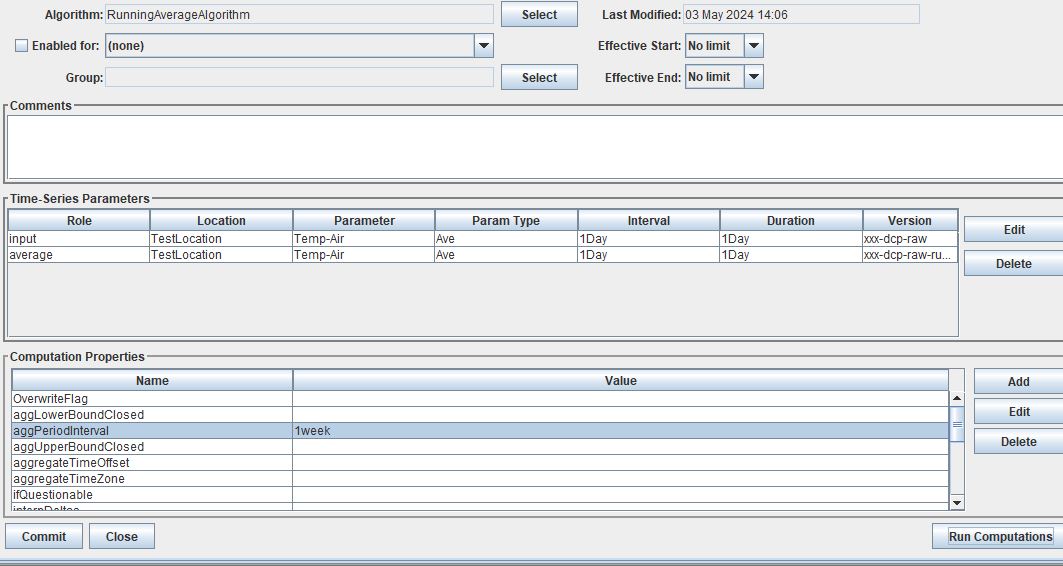
The “running average” algorithm or RunningAverageAlgorithm will take an input time series at some resolution and calculate an average based on the previous aggregate periodo interval. For example, if the aggregate period interval is one week, then the running average for a daily time series will be calculated based on the previous 6 days and current day.
By default the following criteria are met or assumed in the algorithm.
Role |
Role Name |
|---|---|
Inputs |
input |
Outputs |
average |
See the images above and below to better understand how the algorithm behaves.
ScalarAdder
Exec Class: decodes.tsdb.algo.ScalerAdder
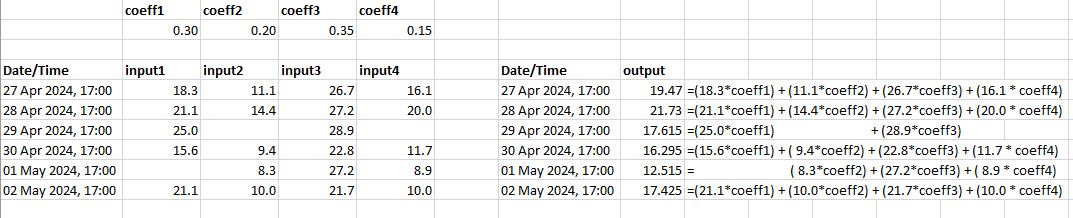
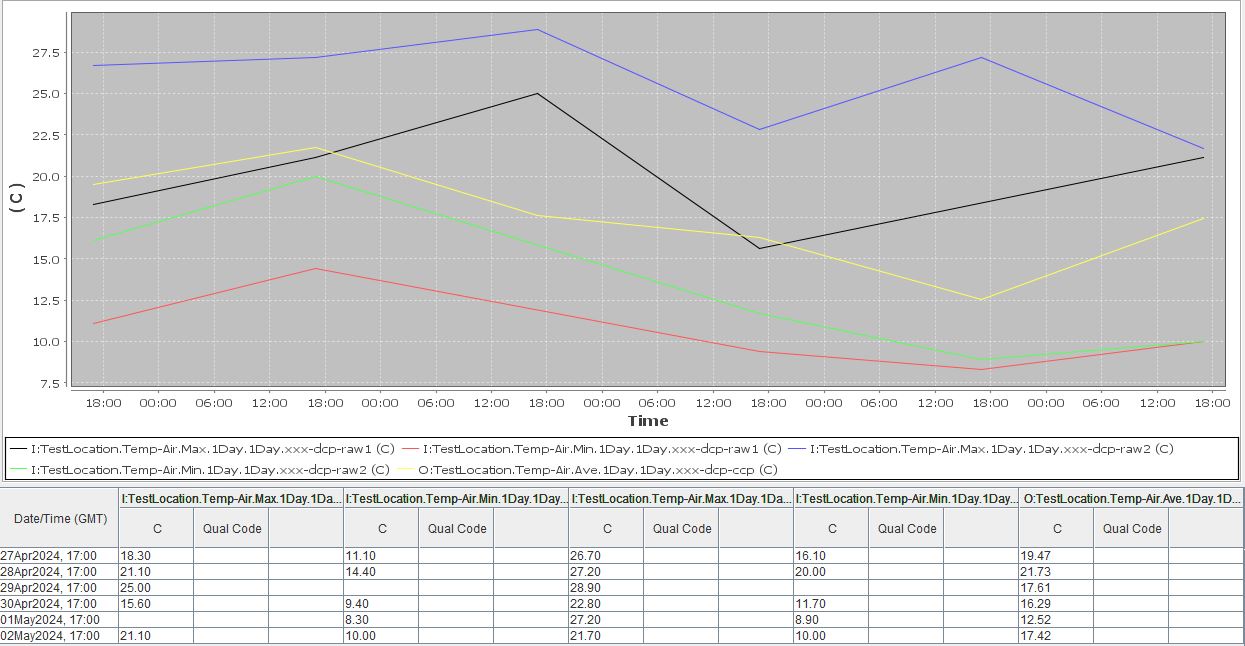
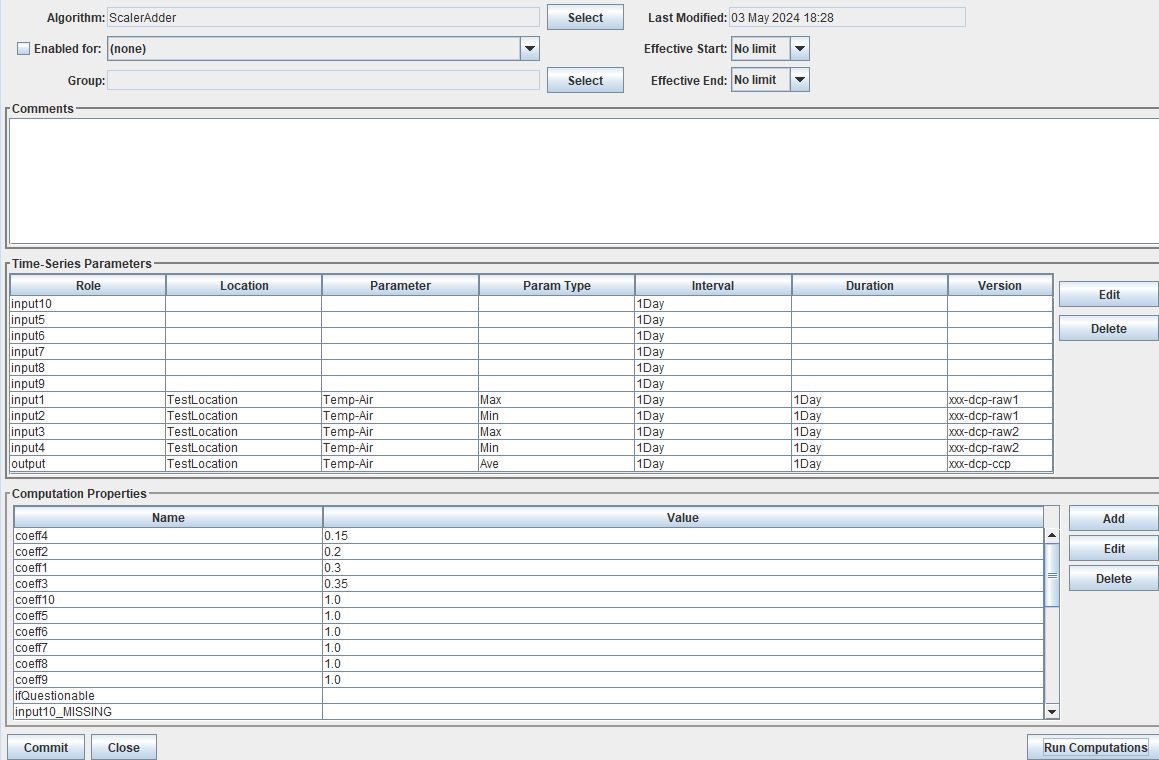
The “scaler adder” algorithm or ScalarAdder will calculate a sum over a specific time slice from multiple time series. There is an option to include multipliers to each time series. There are no restrictions for the multipliers.
Role |
Role Name |
|---|---|
Inputs |
input1 |
input2 |
|
input3 |
|
input4 |
|
input5 |
|
input6 |
|
input7 |
|
input8 |
|
input9 |
|
input10 |
|
Outputs |
output |
SubSample
Exec Class: decodes.tsdb.algo.SubSample
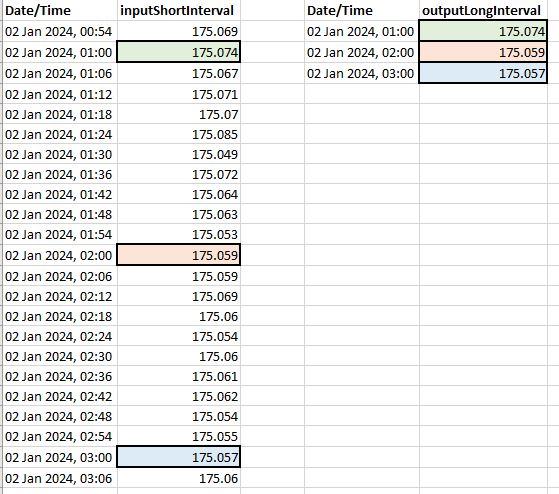
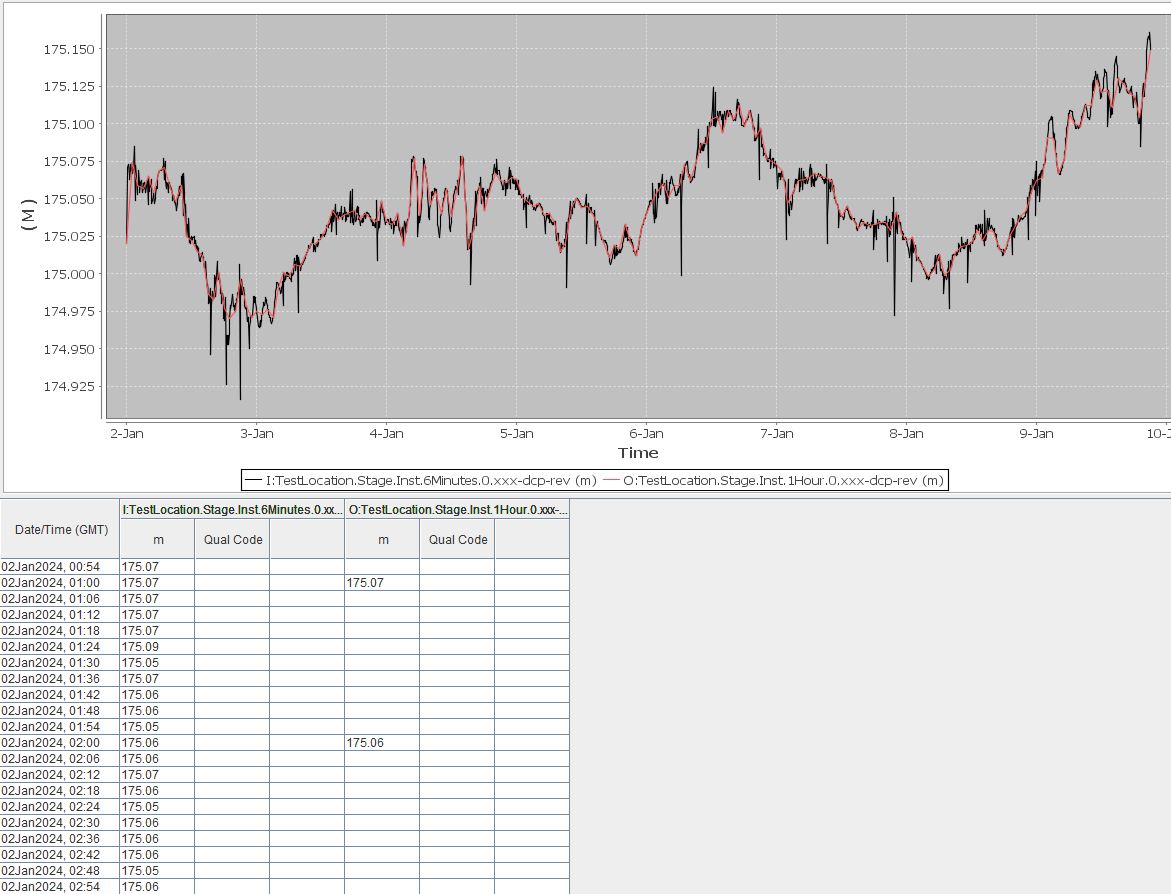
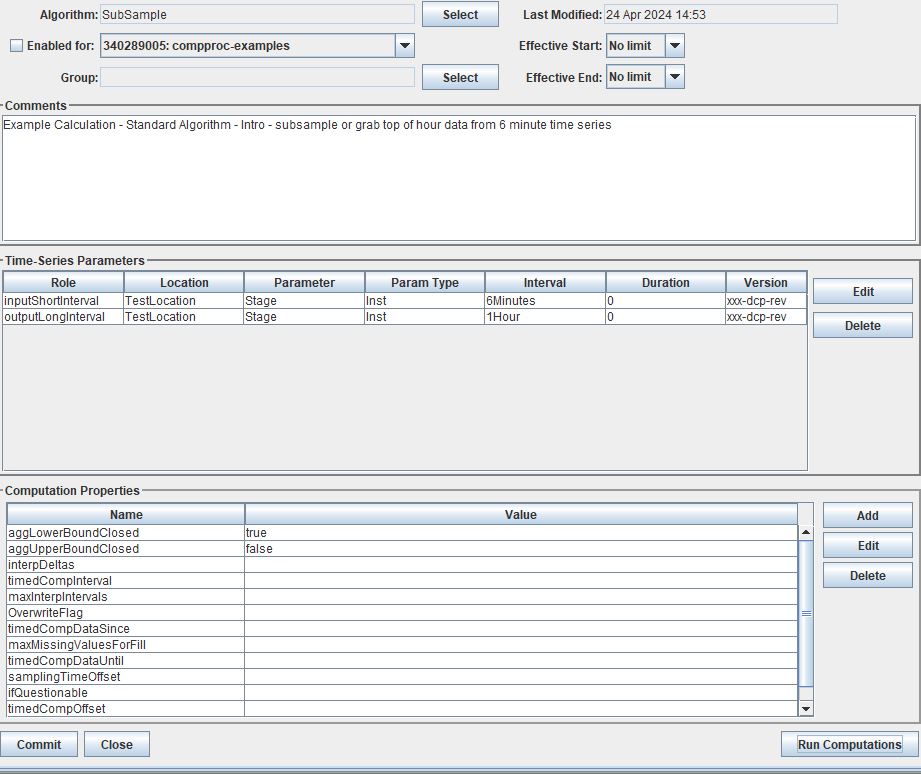
The “sub sample” algorithm or SubSample will turn a time series of a high resolution to a lower resolution. For example, an hourly instantaneous time series might be converted into a daily instantaneous time series by sampling the top of day hour. Or a 15-minute time series may be turned into an hourly time series by sampling the top of hour values.
Role |
Role Name |
|---|---|
Inputs |
input |
Outputs |
output |
SumOverTimeAlgorithm
Exec Class: decodes.tsdb.algo.SumOverTimeAlgorithm
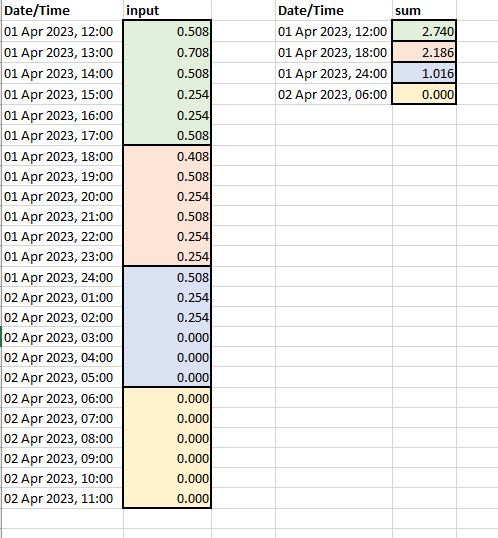
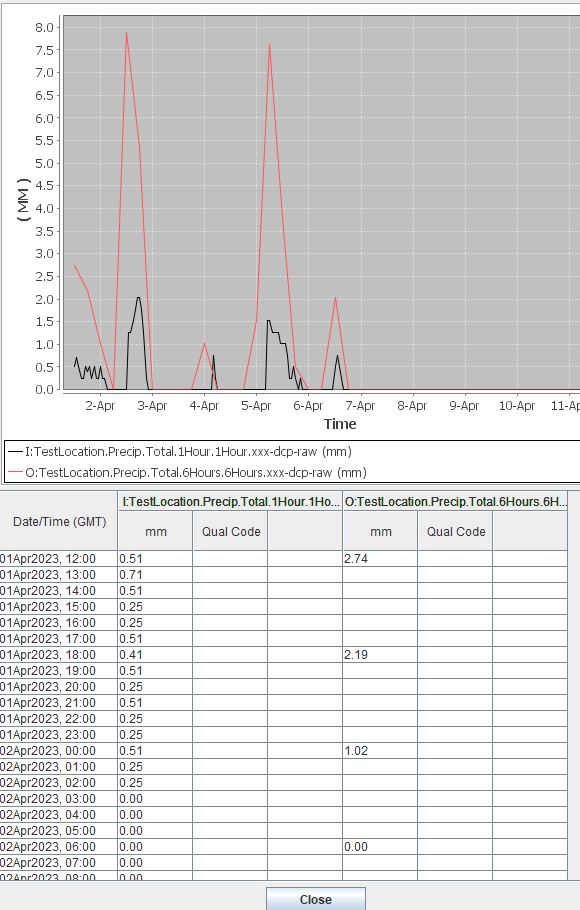
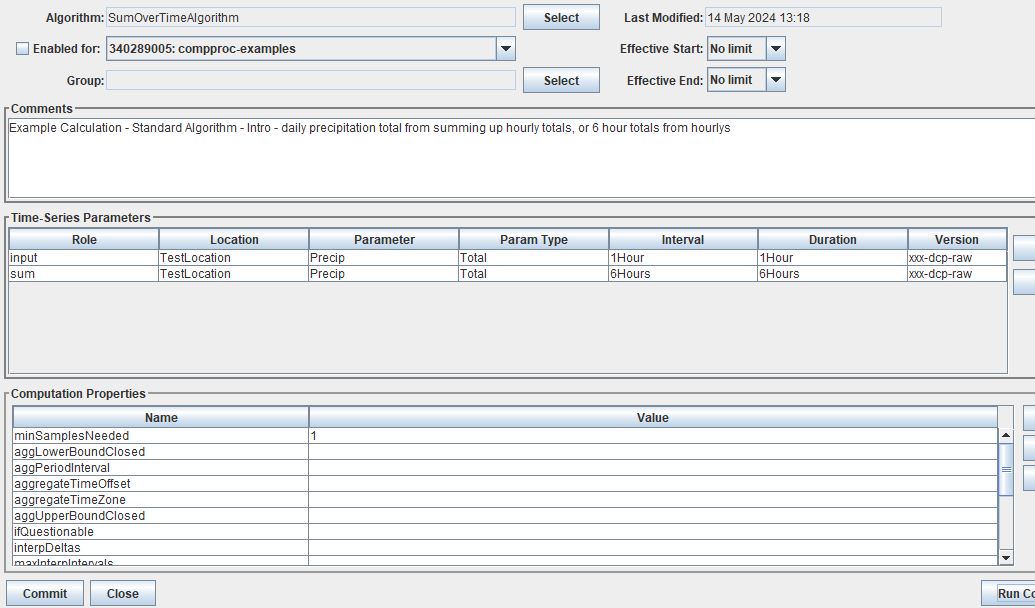
The “sum over time” algorithm or SumOverTimeAlgorithm will calculate the sum over a given period of time. For example hourly values can be added up over a day to calculate a daily time series. Or a daily time series can be added up to calculate a weekly or monthly total. By default the aggLowerBoundClosed property is False and the aggUpperBoundClosed property is True. The minSamplesNeeded by default is 1.
Role |
Role Name |
|---|---|
Inputs |
input |
Outputs |
output |
ToIrregularUsingPattern
The ToIrregularusingPattern Algorithm generates a new time series data set from an existing irregular or regular interval time series data set. The times for the new time series are defined by the times of a second time series data set. Values for the new time series are computed from the original time series data by interpolating between the two bounding input point using three methods. The data type of the original time series data governs how values are interpolated.
Data type “INST-VAL” (or “INST-CUM”) considers the value to change linearly over the interval from the previous data value to the current data value.
Data type “PER-AVER” considers the value to be constant at the current data value over the interval.
Data type “PER-CUM” considers the value to increase from 0.0 (at the start of the interval) up to the current value over the interval.
Interpolation of the three data types is illustrated below.

Role |
Role Name |
|---|---|
Inputs |
input |
Inputs |
pattern |
Outputs |
output |
… more content coming soon …
Standard - Hydrologic
Algorithm |
Description |
|---|---|
BridgeClearance |
Subtract water level from constant ‘low chord’ |
EstimatedInflow |
Estimate inflow based on change in storage and outflow |
IncrementalPrecip |
Compute incremental precip from cumulative precip |
RdbRating |
Implements rating table computations - flow vs stage |
TabRating |
Implements rating table computations - flow vs stage |
UsgsEquation |
USGS Equation O = A* (B + I)^C + D |
VirtualGage |
Compute virtual elevation based on two other gages |
RelativeHumidity |
Compute relative humidity from temperature and dewPoint |
BridgeClearance
Exec Class: decodes.tsdb.algo.BridgeClearance


EstimatedInflow
Exec Class: decodes.tsdb.algo.EstimatedInflow
IncrementalPrecip
Exec Class: decodes.tsdb.algo.IncrementalPrecip
RdbRating
Exec Class: decodes.tsdb.algo.RdbRating
… more content coming soon …
TabRating
Exec Class: decodes.tsdb.algo.TabRating
… more content coming soon …
UsgsEquation
Exec Class: decodes.tsdb.algo.UsgsEquation
… more content coming soon …
VirtualGage
Exec Class: decodes.tsdb.algo.VirtualGage
… more content coming soon …
RelativeHumidity
Exec Class: decodes.tsdb.algo.RelativeHumidity
Calculates relative humidity with temperature and dew point data. Air temperature and dew point temperature are assumed to be in °C. Calculates relative humidity RH using the formula, RH = 100 × {exp[17.625 × Dp/(243.04 + Dp)]/exp[17.625 × T/(243.04 + T)]}. dew point temperature can not be above air temperature and output most share same interval as the temperature timeSeries.
By default the following criteria are met or assumed in the algorithm.
Role |
Role Name |
|---|---|
Inputs |
temperature |
dewPoint |
|
Outputs |
output |
… more content coming soon …
CWMS Only - Hydrologic
Algorithm |
Description |
|---|---|
CwmsRatingMultiIndep |
Implements CWMS Rating Computations |
CwmsRatingSingleIndep |
Implements CWMS Rating Computations |
CwmsScreening |
CWMS Validation with CWMS Screening Records |
DatchkScreening |
CWMS Validation with DATCHK files |
CwmsRatingMultiIndep
Exec Class: decodes.cwms.rating.CwmsRatingMultIndep
CwmsRatingSingleIndep
Exec Class: decodes.cwms.rating.CwmsRatingSingleIndep
CwmsScreening
Exec Class: decodes.cwms.validation.CwmsScreeningAlgorithm
DatchkScreening
Exec Class: decodes.cwms.validation.DatchkScreeningAlgorithm
HDB Only - Hydrologic
Algorithm |
Description |
|---|---|
CallProcAlg |
decodes.hdb.algo.CallProcAlg |
DynamicAggregateAlg |
decodes.hdb.algo.DynamicAggregateAlg |
EOPInterpAlg |
decodes.hdb.algo.EOPInterpAlg |
EquationSolverAlg |
decodes.hdb.algo.EquationSolverAlg |
EstGLDAInflow |
decodes.hdb.algo.EstGLDAInflow |
FLGUUnreg |
decodes.hdb.algo.FLGUUnreg |
FlowToVolumeAlg |
decodes.hdb.algo.FlowToVolumeAlg |
GLDAEvap |
decodes.hdb.algo.GLDAEvap |
GLDAUnreg |
decodes.hdb.algo.GLDAUnreg |
GlenDeltaBSMBAlg |
decodes.hdb.algo.GlenDeltaBSMBAlg |
HdbLookupTimeShiftRating |
decodes.hdb.algo.HdbLookupTimeShiftRating |
HdbShiftRating |
decodes.hdb.algo.HdbShiftRating |
InflowAdvancedAlg |
decodes.hdb.algo.InflowAdvancedAlg |
InflowBasicAlg |
decodes.hdb.algo.InflowBasicAlg |
MPRCUnreg |
decodes.hdb.algo.MPRCUnreg |
NVRNUnreg |
decodes.hdb.algo.NVRNUnreg |
ParshallFlume |
decodes.hdb.algo.ParshallFlume |
PowerToEnergyAlg |
decodes.hdb.algo.PowerToEnergyAlg |
SideInflowAlg |
decodes.hdb.algo.SideInflowAlg |
SimpleDisaggAlg |
decodes.hdb.algo.SimpleDisaggAlg |
TimeWeightedAverageAlg |
decodes.hdb.algo.TimeWeightedAverageAlg |
VolumeToFlowAlg |
decodes.hdb.algo.VolumeToFlowAlg |
OpenDCS Custom Algorithms
In addition to the standard algorithms outlined above, users can set up custom algorithms that can be called upon in calculations. There are two methods for creating custom algorithms: python and java.
Python Algorithms
Exec Class: decodes.tsdb.algo.PythonAlgorithm
Creating a New Python Algorithm <https://opendcs-env.readthedocs.io/en/latest/legacy-cp-userguide.html#creating-a-new-python-algorithm>
Java Algorithms
There are examples in the OpenDCS source code <https://github.com/opendcs/opendcs/tree/master/src/main/java/decodes/tsdb/algo>