Open Time Series Database
(OpenTSDB)
Overview
OpenTSDB (TSDB = Time Series Database) is an extension of OpenDCS first included in the 6.5 release. This manual describes the schema and utilities making up OpenTSDB.
Note
Do not confuse with http://opentsdb.net/. We will be renaming our reference timeseries database after some work on the build and release infrastructure.
Revision History
Rev 1: OpenDCS 6.5 RC01, June, 2018:
Initial release
Rev 2: OpenDCS 6.7 RC01, February, 2020
This release supports computations.
The sections on Exporting and Importing time series data have been expanded and improved. The “outputts” and “importts” utilities now provide a good way of backing up time series data in an ASCII file, or for transferring data from one database to another. For example, you could use this to transfer data from a CWMS database into OpenTSDB.
Rev 3: OpenDCS 6.7 RC02, March, 2020
Define bits used for time series values.
Installation and Configuration
Fresh Schema Install
Schema installation and updates are now handled through the MigrateApp CLI interface. Please review the database installation section of the installation guide.
Configure OpenDCS
Follow the instructions in the OPENDCS Installation Guide to configure your database. Make sure the Database Type is set to OPENTSDB.
TSDB-Specific Properties
The database schema contains a table “tsdb_property” (see schema below). Currently the only way to add values to the table is with direct SQL statements. This will be improved in future releases. The following properties will affect OpenTSDB operation:
allowDstOffsetVariation: (default = true) Allowing the variation means that daily averages may vary by an hour over a DST change. Setting to false will force OpenTSDB to operate like CWMS: The UTC Offsets must remain consistent for all values stored.
offsetErrorAction: (default = ROUND) One of IGNORE, REJECT, or ROUND. This determines how sample times may be modified for time series values stored in the database for regular interval time series:
INGORE – means to do nothing. Store time values as-is
ROUND – means to round to the nearest regular interval
REJECT – means to reject values that are not on a regular interval
storagePresentationGroup: (default = CWMS-English) When creating a new time series, the presentation group named here will be used to determine the storage units based on the data type of the time series being created.
Note that for OpenDCS 6.5 a modification has been made for CWMS data types. The presentation group may contain Base Param values only. When attempting to find a match for a data type (e.g. “Stage-Tailwater”), if no exact match is found in the group, the code will look for a match for the base param value (“Stage”). Thus, you only need Base Params in the CWMS-English and CWMS-Metric presentation groups.
You can edit the TSDB_PROPERTY values using a dialog in the Time Series GUI. From the launcher, select Time Series. Then press the TSDB Properties button in the upper right. Each property is shown with an explanation as to its use and proper setting.
Schema
OpenTSDB Time Series ID
An OpenTSDB Time Series Identifier (TSID) has 6 parts, separated by periods:
location . param . statcode . interval . duration . version
The location, param, and version parts are often subdivided with hyphens.
Example:
Crystal-HeadWater.Inst.Elev.1Hour.0.GOES-raw
The components are:
location – This refers to a Site in the DECODES database. This is the site name, preferably with CWMS name-type.
param – This is a DECODES Data Type, preferably with CWMS data type.
statcode – Statistics Code qualifies how the data was measured or calculated. See examples below. (Note – In CWMS this is called param type).
interval – One of the valid intervals in this database. All CWMS intervals are accepted.
duration – 0 (zero) means an instantaneous value. Other intervals can specify the duration over which the value was measured or calculated.
version – A free-form string used to distinguish between different versions of a time series, e.g. raw vs. validated.
TSDB Global Properties
-- Global properties on the database components.

CREATE TABLE TSDB_PROPERTY
(
    PROP_NAME VARCHAR(24) NOT NULL UNIQUE,
    PROP_VALUE VARCHAR(240) NOT NULL,
    PRIMARY KEY (PROP_NAME)
) WITHOUT OIDS;
Metadata About Each Time Series
CREATE TABLE TS_SPEC
(
    TS_ID INT NOT NULL UNIQUE,
    SITE_ID INT NOT NULL,
    DATATYPE_ID INT NOT NULL,
    STATISTICS_CODE VARCHAR(24) NOT NULL,
    INTERVAL_ID INT NOT NULL,
    DURATION_ID INT NOT NULL,
    TS_VERSION VARCHAR(32) NOT NULL,
    ACTIVE_FLAG VARCHAR(5) DEFAULT 'TRUE' NOT NULL,
    STORAGE_UNITS VARCHAR(24) NOT NULL,
    -- Number of data storage table where values for this TS are stored.
    STORAGE_TABLE INT NOT NULL,
    -- 'N' for numeric, 'S' for String.
    STORAGE_TYPE CHAR DEFAULT 'N' NOT NULL,
    -- Last Modify Time for this record, stored as Java msec time value UTC.
    MODIFY_TIME BIGINT NOT NULL,
    DESCRIPTION VARCHAR(400),
    -- Initially set to NULL. After first ts value written, this is set to
    number of seconds.
    --
    UTC_OFFSET INT,
    -- NULL = use default in TSDB_PROPERTIES, TRUE=allow, FALSE=disallow
    ALLOW_DST_OFFSET_VARIATION VARCHAR(5),
    -- NULL=use default in TSDB_PROPERTIES, ROUND, REJECT, or IGNORE
    OFFSET_ERROR_ACTION VARCHAR(24),
    PRIMARY KEY (TS_ID),
    CONSTRAINT
        time_series_identifier_unique
        UNIQUE
        (
            SITE_ID, DATATYPE_ID,
            STATISTICS_CODE, INTERVAL_ID,
            DURATION_ID, TS_VERSION
        )
) WITHOUT OIDS;
Notes:
TS_ID is a unique numeric key assigned from a sequence when the time series is created.
SITE_ID points to a DECODES Site record. This is analogous to a CWMS location.
DATATYPE_ID points to a DECODES DATATYPE record. This is analogous to a CWMS “Param”.
STATISTICS_CODE is analogous to a CWMS “Param Type”.
INTERVAL_ID and DURATION_ID both point to records in the INTERVAL_CODE table (see below).
STORAGE_UNITS must be a valid DECODES Engineering Unit abbreviation. It specifies the units in which the time series values are stored.
STORAGE_TABLE is an integer which specifies a 4-digit suffix to the table name where the actual data values are stored (see below).
STORAGE_TYPE – currently the only acceptable value is ‘N’. String values are not yet supported.
MODIFY_TIME specifies the last time the TS_SPEC record was modified. It is a Java msec value specifies the number of ms since Midnight, Jan 1, 1970 UTC.
UTC_OFFSET can be used for regular interval data to ensure they all have the same UTC offset.
ALLOW_DST_OFFSET_VARIATION can be set to true to allow the offset to vary based on DST changes. Example: a daily value stored at local midnight would have a UTC_OFFSET variance when DST changes.
Interval and Duration Fields
Valid Interval and Durations are stored in the INTERVAL_CODE table:
CREATE TABLE INTERVAL_CODE
(
    INTERVAL_ID INT NOT NULL UNIQUE,
    -- Interval Name for Display in Pull-Down lists, files, etc.
    NAME VARCHAR(24) NOT NULL UNIQUE,
    -- Java Calendar Constant Name.
    -- One of MINUTE, HOUR_OF_DAY, DAY_OF_MONTH, WEEK_OF_YEAR, MONTH, YEAR
    CAL_CONSTANT VARCHAR(16) NOT NULL,
    -- Multiplier for calendar constant.
    -- Zero means instantaneous.
    CAL_MULTIPLIER INT NOT NULL,
    PRIMARY KEY (INTERVAL_ID)
) WITHOUT OIDS;
Time Series Values
The software tries to spread the time series values among the available tables that you created when you installed the database, or when you run the Rebalance utility (see below).
Table names are TS_NUM_NNNN, where NNNN is a 4 digit suffix. To determine the table, take the TS_SPEC.STORAGE_TABLE integer and format it as a 4-digit number. The tables have the following format:
CREATE TABLE TS_NUM_0001

(
    TS_ID INT NOT NULL,
    SAMPLE_TIME BIGINT NOT NULL,
    TS_VALUE DOUBLE PRECISION NOT NULL,
    -- Bitwise flags for each value
    FLAGS BIGINT NOT NULL,
    SOURCE_ID INT NOT NULL,
    DATA_ENTRY_TIME BIGINT NOT NULL,
    PRIMARY KEY (TS_ID, SAMPLE_TIME)
) WITHOUT OIDS;
Thus all values for a given time series are in the same table. This is different from CWMS, which divides the values by time: Each year has a separate data table in CWMS.
The FLAGS word is a collection of bit flags indicating various validation and other conditions. The following code defines the bits used by OpenTSDB. Bits not defined are reserved for future use:
// The value was successfully screened.
public static final int SCREENED = 0x00010000;
// Apply this mask and compare to SCR_VALUE_xxx definitions
// to obtain result
public static final int SCR_VALUE_RESULT_MASK = 0x000E0000;
public static final int SCR_VALUE_GOOD = 0x00000000;
public static final int SCR_VALUE_REJECT_HIGH = 0x00020000;
public static final int SCR_VALUE_CRITICAL_HIGH = 0x00040000;
public static final int SCR_VALUE_WARNING_HIGH = 0x00060000;
public static final int SCR_VALUE_WARNING_LOW = 0x00080000;
public static final int SCR_VALUE_CRITICAL_LOW = 0x000A0000;
public static final int SCR_VALUE_REJECT_LOW = 0x000C0000;
// Apply this mask and compare to SCR_ROC_xxx definitions
// to obtain result
public static final int SCR_ROC_RESULT_MASK = 0x00700000;
public static final int SCR_ROC_GOOD = 0x00000000;
public static final int SCR_ROC_REJECT_HIGH = 0x00100000;
public static final int SCR_ROC_CRITICAL_HIGH = 0x00200000;
public static final int SCR_ROC_WARNING_HIGH = 0x00300000;
public static final int SCR_ROC_WARNING_LOW = 0x00400000;
public static final int SCR_ROC_CRITICAL_LOW = 0x00500000;
public static final int SCR_ROC_REJECT_LOW = 0x00600000;
public static final int SCR_STUCK_SENSOR_DETECTED = 0x00800000;
// The following is NOT stored in data values, but used by the
// alarm system only
public static final int SCR_MISSING_VALUES_EXCEEDED = 0x01000000;
Time Series Properties
TS_PROPERTY records are not currently used. They are intended for future expansion where there may be a need for additional meta-data not currently stored in TS_SPEC.
CREATE TABLE TS_PROPERTY
(
    TS_ID INT NOT NULL,
    PROP_NAME VARCHAR(24) NOT NULL,
    PROP_VALUE VARCHAR(240) NOT NULL,
    PRIMARY KEY (TS_ID, PROP_NAME)
) WITHOUT OIDS;
Time Series Value Data Sources
The TSDB tracks the source of every value in the database through the SOURCE_ID field in the TS_NUM_nnnn tables. The SOURCE_ID refers to a record in TSDB_DATA_SOURCE:
CREATE TABLE TSDB_DATA_SOURCE

(

SOURCE_ID INT NOT NULL UNIQUE,

LOADING_APPLICATION_ID INT NOT NULL,

-- Further describes source: If DECODES routing spec,

-- this should be the rs and ds names.

-- If manual entry, this is user name

-- If computation, this is comp name

-- If modeled, this is the model name, etc.

MODULE VARCHAR(120),

PRIMARY KEY (SOURCE_ID)

) WITHOUT OIDS;
The combination of LOADING_APPLICATION_ID and MODULE should be unique. Thus a TSDB_DATA_SOURCE tells us, for each value, what application and module within that application created that values. Examples are:
Routing Scheduler / Routing Spec Name
Computation Processor / Computation Name
Time Series Value Annotions
TS_ANNOTATION records are not currently used. They are intended for a new feature whereby a user could add a free form text annotation describing time series values over a given time range.
CREATE TABLE TS_ANNOTATION

(

ANNOTATION_ID INT NOT NULL UNIQUE,

TS_ID INT NOT NULL,

START_TIME BIGINT NOT NULL,

END_TIME BIGINT NOT NULL,

ANNOTATION_TEXT VARCHAR(1000) NOT NULL,

PRIMARY KEY (ANNOTATION_ID)

) WITHOUT OIDS;
DECODES OpenTSDB Consumer
The OpenTSDB Consumer writes time series data to the OpenTSDB. If you have an older OpenDCS Installation, your database may not have the consumer in its list. Before attempting to use the consumer, run the Reference List Editor (rledit). On the Enumerations Tab, select the Data Consumer enumeration. Make sure there is an entry for opentsdb and the the java class is exactly as shown below.
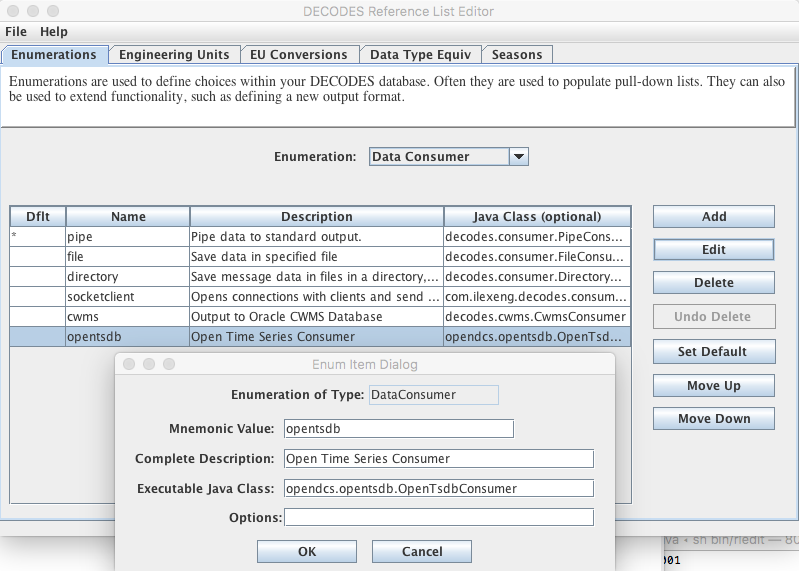
The Java class must be exact:
opendcs.opentsdb.OpenTsdbConsumer
When using the consumer, you may specify the following properties in the routing spec:
Property Name |
De fault |
Description |
|---|---|---|
databaseLocation |
null |
By default, it will assume that you want to ingest data into the same database that hosts your DECODES data. If you want to write to a different OpenTSDB, you can specify the location URL here. |
dbAuthFile |
null |
Not needed if databaseLocation is the default (null). If you are connecting to a different OpenTSDB, you can run ‘setDecodesUser’ with a file name to create an encrypted file containing the username and password. Then specify that file name as a property here. |
jdbcOracleDriver |
null |
Also not needed if you are writing to the same database as DECODES. If it is a different database, you can specify the JDBC driver class here. The value for postgres is ‘org.postgresql.Driver’ The value for Oracle is ‘oracle.jdbc.driver.OracleDriver’ |
appName |
decodes |
The consumer will make a connection to the database as this application. OpenTSDB tracks connections by app name. |
dataTypeStandard |
CWMS |
Specifies which sensor data type to use to build the TSID. (See below.) |
shefParamMapping |
null |
If you want to map SHEF-PE codes to the param type of the TSID, specify a mapping file here. (See below.) |
tsidDuration |
0 |
The default duration part for a time series ID if none is specified in the individual sensors. (See below.) |
tsidVersion |
raw |
The default version for a time series ID if none is specified in the individual sensors. (See below.) |
canCreateTs |
true |
Set to false if you do NOT want this routing spec to be able to create time series if it builds a TSID that does not yet exist. |
Building the TSID
This section exlains how the consumer takes information from the DECODES database to build the TSID.
Location
The Location part is taken from the DECODES site where the platform is located, or, if a sensor-specific site has been specified, it is used.
The CWMS name type is selected if one is present. If not, the preferred name type that you specified in your DECODES settings is used.
Param
The Param part is taken from one of the DECODES Data Type codes assigned to the sensor. A routing spec property called ‘dataTypeStandard’ may be used to specify one of the valid Data Type Standards in your database.
Hint: You can use the Reference List Editor (rledit) to define which data type standards are valid in your database.
If no property is specified, CWMS is used as a default.
Then if the specified data type is present it is used. If not, the sensor is skipped.
Exception for SHEF Parameter Mapping: If you specify a property named ‘shefParamMapping’ containing the name of a mapping file, then the SHEF-PE data type code will be used to look up a parameter in the named file. The format of each line in the file is:
SHEFCODE=Param
Statistics Code
If a DECODES Sensor Property named either ‘statcode’ or ‘CwmsParamType’, then the value will be used as the statcode part of the TSID. Otherwise, ‘Inst’ will be used.
Interval
If a Sensor Property named ‘cwmsInterval’ is present, it will be used as the interval part of the TSID. Otherwise:
If the recording mode is Variable (meaning an irregular time series), interval will be set to 0.
Otherwise the interval will be derived from the specified recording interval in seconds.
Duration
If a Sensor Property named ‘cwmsDuration’ is present, it will be used as the duration part of the TSID. Otherwise:
If the recording mode is Variable (meaning an irregular time series), interval will be set to 0.
Else, if the Statistics Code determined above is ‘Inst’, 0 will be used as the duration.
Else, the interval determined above will be used.
Version
The routing spec property ‘cwmsVersion’ may be used to specify the default version part for all sensors. If none is specified, the default is ‘raw’.
Each sensor can also specify a property named ‘cwmsVersion’ that will override the default.
The following routing spec runs in real time and ingests data into the OpenTSDB:
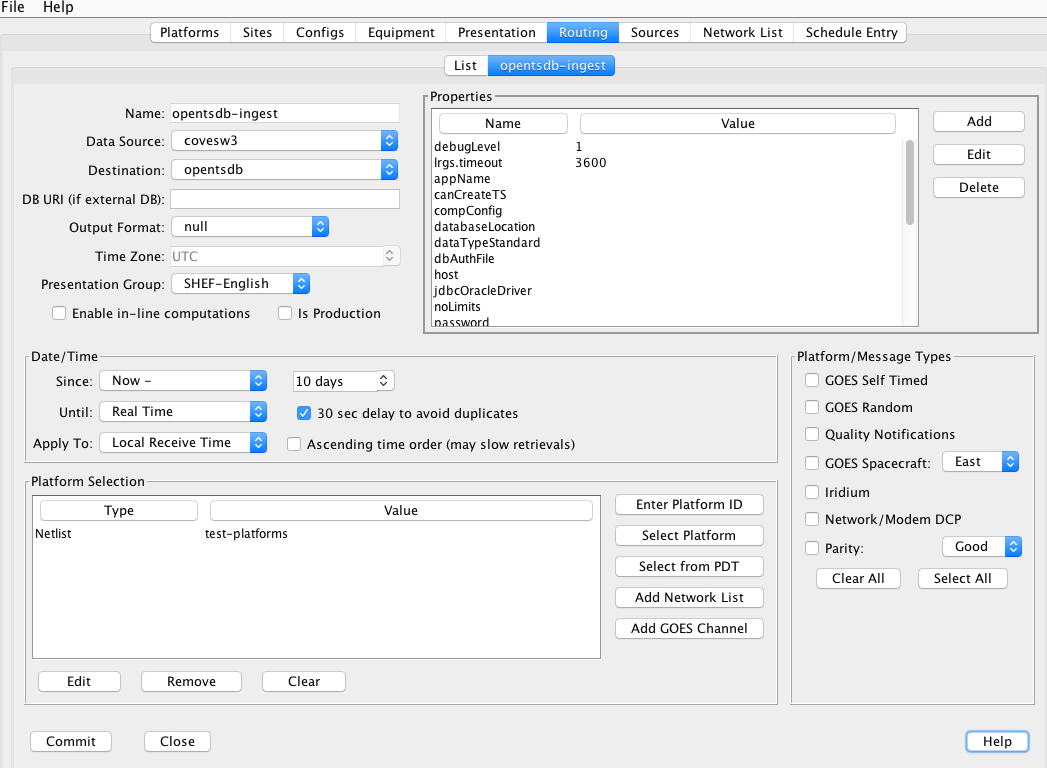
Note:
Since we are ingesting into the same database where DECODES is running, no DB URI or username or password are necessary.
Output Format=null, because we are not formatting data, but rather placing it into the TSDB tables.
SHEF-English presentation group is used. This will determine storage units when creating new time series in the database.
Time Series Utilities
Updating Old Schema
If you installed the database from pre OpenDCS 6.5 schema files you will need to update. A Java utility is provided to do this.
Command:
dbupdate
You will be prompted to enter the TSDB Schema owner’s database username and password. Tables will be modified to conform to OpenDCS 6.5 schema. the internal TSDB_DATABASE_VERSION number will be set to 16.
GUI Time Series List
The Time Series List GUI can be activated from the Launcher Button panel or from the “tslist” script:
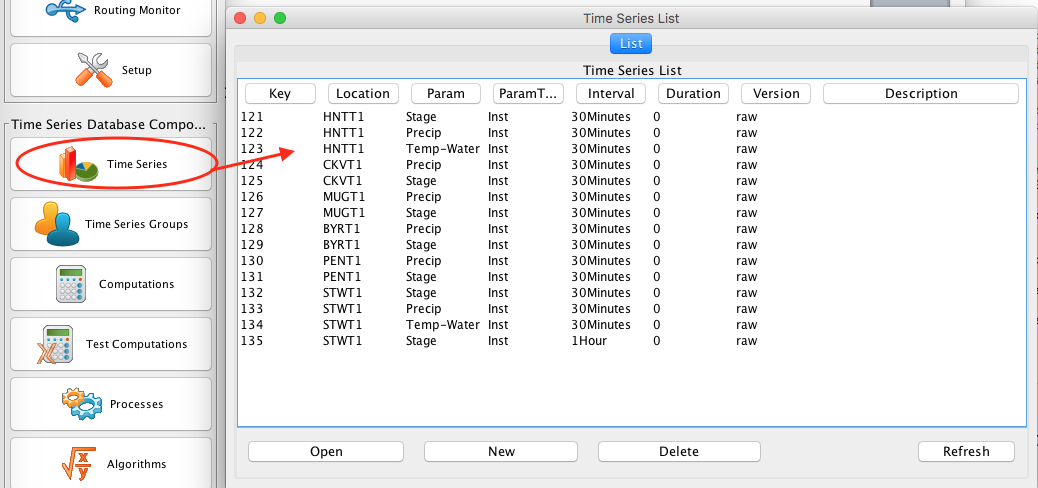
It shows a list of time series which may be sorted in different ways by clicking the column headers.
This GUI is not unique to OpenTSDB. It also works for CWMS and HDB.
Buttons:
Open – Not yet implemented. In a future release this will provide a way to edit the meta data about a time series, change its storage units, etc.
New – Brings up a dialog in which you can specify the time series identifier components and create a new time series.
Delete – Deletes a time series including all of its values and meta data.
Refresh – refreshes the list from the database.
Outputting Time Series Values
Command:
outputts [options] TSID|group:groupName|all [TSID2 …]
This command can output time series data in any of the DECODES data formats. Run with –x for a help message showing options:
$ bin/outputts -x
Error: Unknown option -x
Usage: program [-Y <String>] [-P <String>] [-d <Int>] [-l <String>] [-D <String> …] [-c <String>] [-t ] [-m <Int>] [-a <String>] [-S <String>] [-U <String>] [-F <String>] [-Z <String>] [-L <String>] [-G <String>] [-I <String>] <String> …
-d ‘debug-level’ Default: 0
-l ‘log-file’ Default: util.log
-S ‘Since Time dd-MMM-yyyy/HH:mm’
-U ‘Until Time dd-MMM-yyyy/HH:mm’
-F ‘OutputFormat’ Default: Human-Readable
-Z ‘Time Zone’ Default: UTC
-L ‘Lookup Type’ Default: id
-G ‘PresentationGroup’
-I ‘TransportID’
‘time-series-IDs | all | group:groupname’
Examples:
Output a specific time series values since midnight May 15 in HydroJSON format:
outputts -S 15-May-2018/00:00 -F HydroJSON HNTT1.Stage.Inst.30Minutes.0.raw
Output all values for a specific time series:
outputts -S all -F tsimport HNTT1.Stage.Inst.30Minutes.0.raw > somefile
Output all values for time series in a group named “Stages”:
outputts -S all -F tsimport group:Stages > somefile
Output all values for all time series. This is suitable for making a backup of for transferring time series values to some other database:
outputts -S all -F tsimport all > somefile
Output is written to stdout. You can redirect to file if desired.
Note: Using the tsimport format as shown in the example above is the easiest way to transfer data from one database to another.
Example: suppose you wanted to transfer data from a group of time series on your CWMS database into an OpenTSDB database. Suppose the group is called “Stages”.
On the CWMS Database, run:
outputts -S all -F tsimport group:Stage > somefile
Transfer “somefile” from the CWMS machine to the OpenTSDB installation.
On the OpenTSDB installation run:
importts somefile
Importting Time Series Values
Command:
importts *filename*
Description:
Reads the file and imports the data into HDB.
The file has three types of lines:
SET:TZ=TimeZone
TSID:Full Time Series Path Name
SET:UNITS=Units Abbreviation, e.g. “ft”
Data line: YYYY/MM/DD-HH:MM:SS,Value,Flags
The SET and TSID apply to all subsequent data lines.
The ‘Rebalance’ Utility
The Rebalance utility can be used to add new data tables after the initial installation.
Command:
decj opendcs.opentsdb.Rebalance [*-N numTables*]
Where the optional numTables integer specifies the number of numeric tables to add to the database.
Scenario: You created the database with a very small number of numeric tables (say, 10), but now that you have hundreds of time series, data writes and retrievals are becoming slow. You wish to create new numeric data tables and then move existing time series among the tables to balance the load.
List Time Series Data Sources
This utility lists all of the unique TSDB_DATA_SOURCE records in the database.
Command:
decj opendcs.opentsdb.ListDataSources
The Generic “DbUtil” Utility
A generic utility to perform various operations on the database has existed for some time. It works with CWMS, HDB, or OpenTSDB.
Command:
bin/decj decodes.tsdb.DbUtil
Type the ‘help’ command to get a list of available commands. New commands are added from time to time:
cmd: help
Valid commands are:
list-site [startsWith] List sites, optionally starting with a specified string, sorted name.
delete-site [default-site-name] - delete site by its default site name
delete-platform [id|site] [platformId or SiteName] - delete platform by ID or site name
list-ts [contains] List Time Series, optionally with id containing specified string, sorted name.
loc-aliases List all location aliases
ts-aliases List all time-series aliases
delete-ts [contains] List Time Series, optionally with id containing specified string, sorted name.
list-dev List Device Statuses
update-dev [devname] [procname] [mediumId] [status] List Device Statuses
events-containing [string] List events containing a specified string
event [priority (I,W,F)] [subsystem] [event text…]
sched-event [priority (I,W,F)] schedStatusId platformId(or -1) subsystem [event text…]
version – show DECODES and tsdb database versions
bparam – show CWMS Base Param - Unit Associations
select – An arbitrary database SELECT statement.
alter – An arbitrary database ALTER statement.
update – An arbitrary database UPDATE statement.
hdbRating – Install a test rating in HDB.
tsdbSpecs – Display statistics on OpenTSDB Storage Tables.
quit - Quit the program
help - Print this message
The “list-ts” command will print a list of time series IDs along with the storage units, storage table number, and description.
The “tsdbSpecs” command will print statistics on the time series specifiers including number of tables, number of values in each table, etc.
Some commands are specific to a database type (CWMS, HDB or OPENTSDB) and will give an error message if executed on the wrong type of database.
Care should be taken when executing update or alter commands.
HydroJSON Server
The HydroJSON Server is a web app that runs under Apache Tomcat. It handles the basic functions of HydroJSON defined on Gunnar’s github page. https://github.com/gunnarleffler/hydroJSON
Deploying the HydroJSON Server
The server is distributed as a “.war” (Web Archive) file suitable for deploying under the Tomcat Application server.
Before deploying you need to fix the “context.xml” file contained in the WAR so that the application can connect to your database. Here are the instructions to do this:
Create a temporary directory and unpack the war file there:
cd $HOME # Or to some directory where you want to work
mkdir tmpwar
cd tmpwar
Now copy the distro file HydroJSON.war into the parent of this directory (i.e. $HOME) and …
jar xvf ../HydroJSON.war
Now the tmpwar directory contains the image that was in the war file.
2. Modify the META-INF/context.xml file with your favorite text editor. It looks like this:
<Context>

<Resource name="jdbc/opentsdb"
    auth="Container"
    type="javax.sql.DataSource"
    maxActive="100"
    maxIdle="30"
    maxWait="10000"
    username="tsdbadmin"
    password="tsdbadmin"
    driverClassName="org.postgresql.Driver"
    url="jdbc:postgresql://localhost/open_tsdb"/>
</Context>
Modify the url to point to your actual database. This is the same URL in the editDatabaseLocation in your decodes.properties file.
Modify the username and password to an account for the Web app to connect.
Rebuild the war file:
jar cvf ../HydroJSON.war \*
4. Deploy the modified war file by copying it into Tomcat’s webapps directory.
Server Request Details
Retrieve Catalog of Sites
/getjson?catalog=[]
Returns a list of all site/locations defined in the database.
Retrieve Catalog of Time Series IDs
getjson?tscatalog=[search_terms]
search_terms= a string containing spec-delimited words. Only TSIDs containing these words will be returned. The check is non-case-sensitive.
Retrieve Data by TSIDs
/getjson?timeseries=TsidSpecs&backward=Duration&time_format=PythonTimeSpec@tz=TimeZoneID
TsidSpecs= [[“tsid1”,”units1”],[“tsid2”,”units2”], …]
Duration= Duration as defined in ISO-8601, but without the leading ‘P’.
PythonTimeSpec= As defined for Python’s strftime function.
TimeZoneID= a standard time zone identifier.
Where
tsidN is a fully-qualified 6-part TSID
unitsN is optional. If not supplied the TS will be in its database storage units.
Duration is optional. If not supplied, only the most recent value for each time series will be returned.
PythonTimeSpec is optional. If not supplied it is %Y-%m-%dT%H:%M:%S in UTC.
The tz argument is optional. If not supplied, UTC will be used.